Showing posts with label Claude Code. Show all posts

Wednesday, August 5, 2026

How Claude Is Reshaping the Industrial Landscape

The most important change in Claude automation is not another model score. It is the point where automation begins. In the past, teams first designed which screen a person should open and which button a robot should press, then connected an RPA or API workflow. Now a task can begin with an outcome: “Read these documents, apply the decision criteria, create a report, and share it with the team.”

Anthropic describes Claude Code as an agentic tool that reads codebases, edits files, runs commands, and connects to development tools. Claude Cowork extends the same architecture beyond the terminal into knowledge work, producing formatted documents, organized files, research summaries, spreadsheets, and presentations. This article examines where Claude overlaps with existing automation products and how the work itself may change.

The transition also extends the development shift described in Claude 4 agentic coding and long-running AI workflows into knowledge work.

The role of records, permissions, and audit trails inside enterprise systems becomes clearer when compared with ServiceNow's AI Control Tower and workflow automation.

The same question appears in Microsoft's vertical integration from Azure to Copilot, where identity and work data become part of the platform strategy.

In this article, “threat” does not mean that existing products will disappear immediately. It means that Claude expands the area where unstructured input can be read, a plan can be formed, and several tools can be called, putting pressure on the way automation products are built, priced, and differentiated. The 90% and 95% figures are the author's conditional estimates, not public benchmarks.

Automation is moving from flows to agents

From Claude Code to Claude Cowork

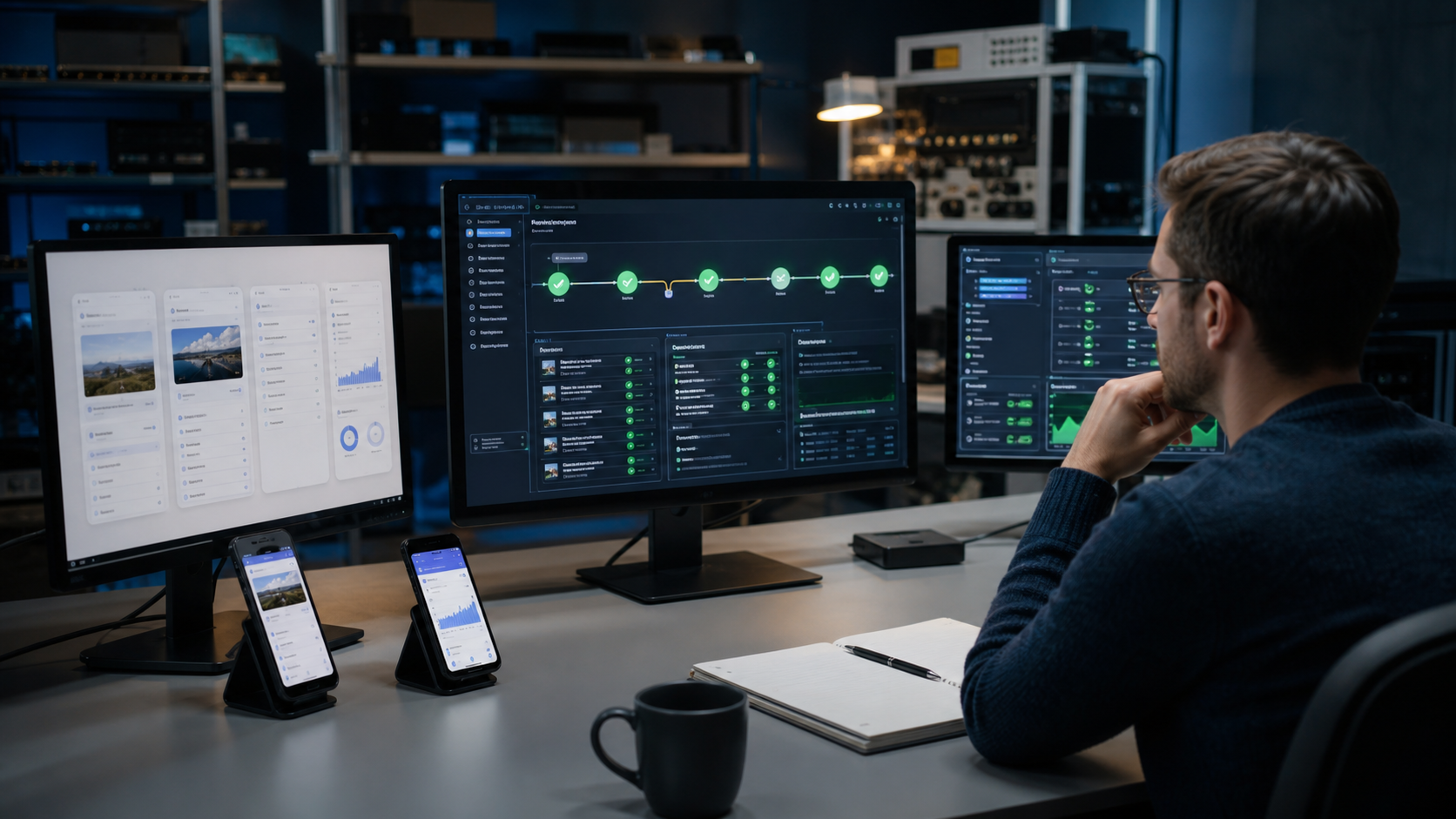
Claude Code is not just a chat window that prints an answer. It is a loop that tries to finish a task: read the code, edit several files, run commands, inspect failures, and choose the next action in the same session. The official Claude Code documentation describes connections to external tools and data through MCP, as well as recurring tasks.
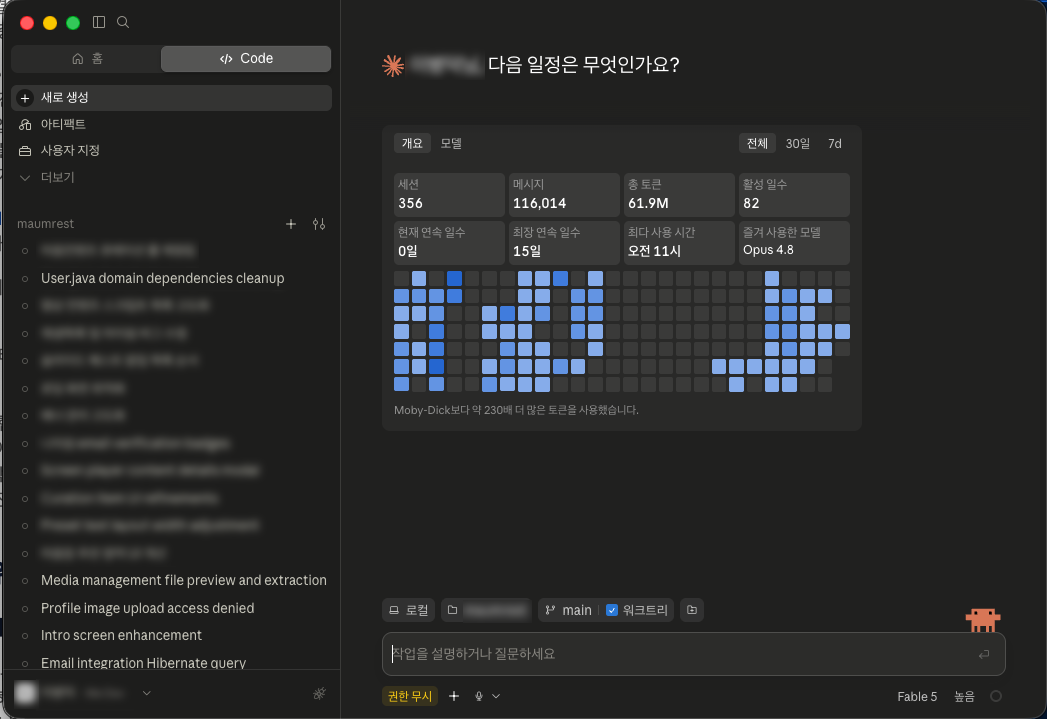
A real Claude Code dashboard showing sessions, token usage, and recent activity

<Claude Code activity dashboard 1.1>

Claude Cowork exposes this structure to non-developers. Instead of learning terminal commands, a user describes the desired outcome. Claude can read files and connectors, carry out multiple steps, and leave behind documents, spreadsheets, or presentations. The Claude Cowork guide describes Cowork as bringing Claude Code's agentic architecture to knowledge work beyond coding, with scheduled tasks and project-level files, instructions, and memory.
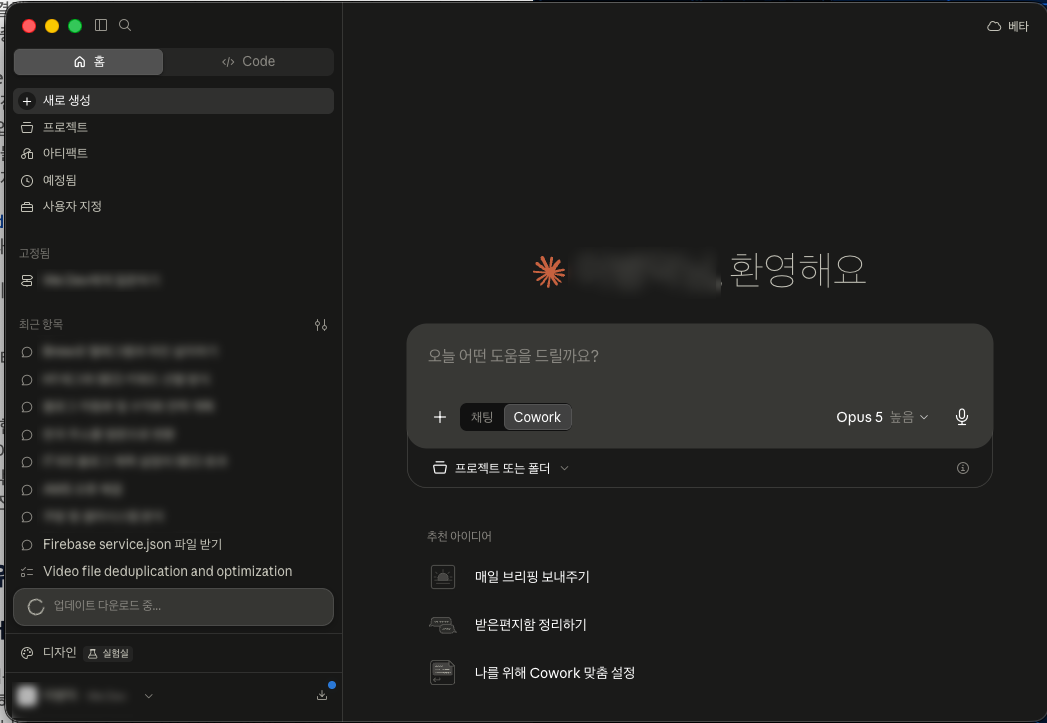
A real Claude Cowork home screen with the Cowork task mode selected

<Claude Cowork task screen 1.2>

The important shift is that developers are no longer the only people who can create the first version of an automation. Developers still need to design permissions, data structures, exception handling, and deployment. But a subject-matter expert can describe what should be processed, when it should happen, and what approval is required.
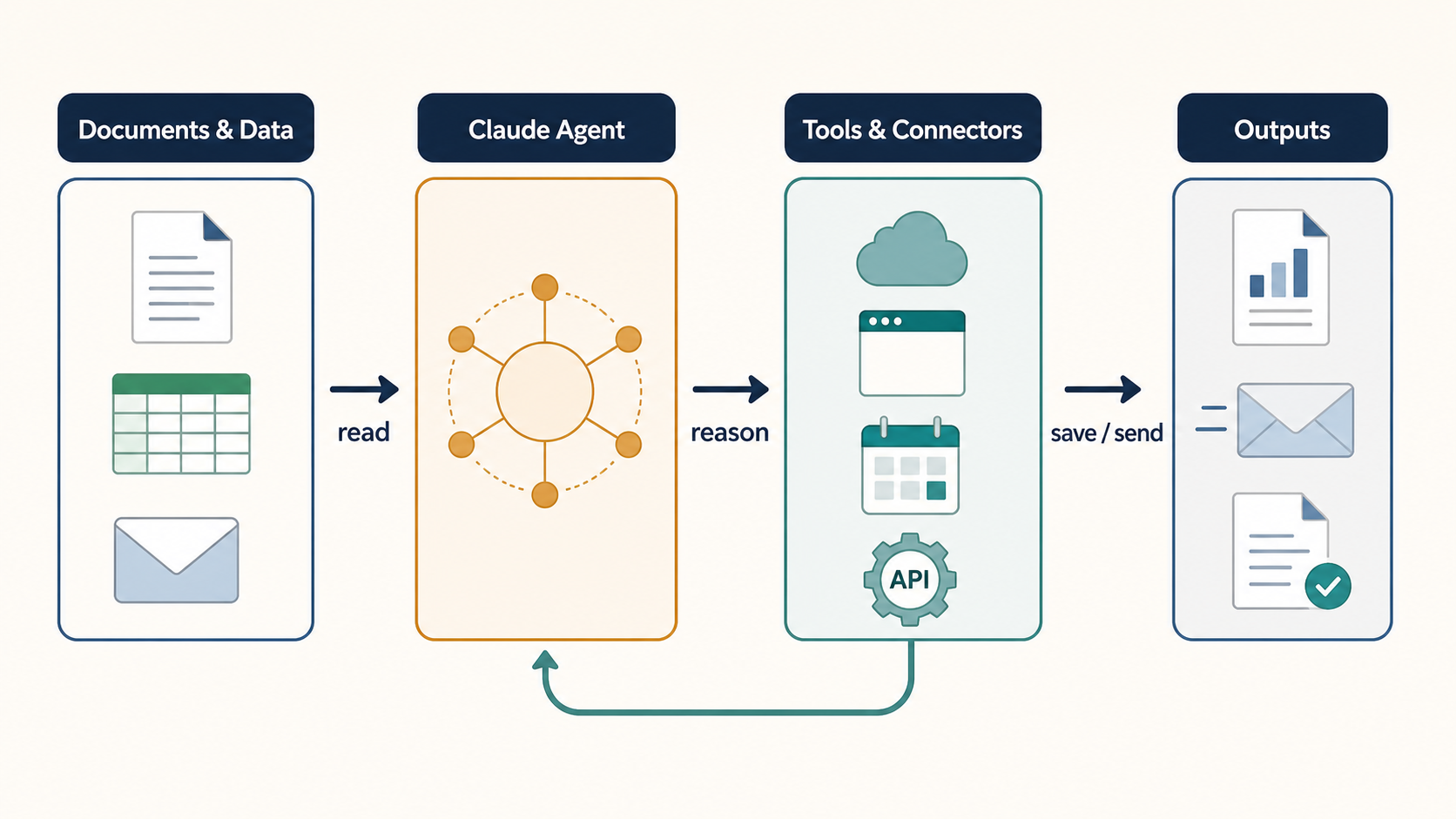
A diagram showing documents and data passing through a Claude Agent to tools and connectors, producing reports and messages

<The Claude agent automation loop 1.3>

Two directions of tool-calling loops

Automation does not have to flow in only one direction. A document can trigger a tool call, or a tool can provide the first input for a new document.

  1. A document-first loop: Read PDFs, Word files, spreadsheets, or email; summarize, classify, and organize the content; save a new document in Google Drive, prepare an email draft, or record the result in a business system.
  2. A tool-first loop: Pull data from a CRM, calendar, Drive, Slack, or an internal API; compare and summarize the results; then create a report, meeting brief, follow-up list, or downstream update.

Anthropic's Google Workspace connector guide describes searching Gmail, Calendar, and Drive, creating documents, and saving generated files to Drive. When no connector exists, computer use in Cowork can navigate a browser or screen directly. It is still a research preview, however, and is slower and more error-prone than a direct connector.

The narrow edge of traditional RPA was the question of exactly where on a computer to read data, which tool to use, and what format to send or save. Screen coordinates, cell locations, filenames, credentials, and exception screens had to be defined in advance. An LLM agent turns part of that problem into contextual reading and planning, but RPA and APIs remain better fits for repetitive work and strict audit requirements.

The automation products Claude puts under pressure

Claude does not replace every existing product. But once a user can describe a goal in natural language, have an agent read an unstructured document, and let it choose the next tool, the overlap with the following product groups grows quickly.

Area Overlapping products Where Claude overlaps Where existing products remain strong
UI and RPA automation UiPath Platform, Power Automate Desktop, Automation Anywhere, Blue Prism Seeing a screen, opening files, and handling long-tail multi-step work Deterministic execution, unattended operation, permissions, audit, retries, and large robot fleets
App connections and iPaaS Zapier Agents, Make AI Agents, n8n, Workato Connecting apps and APIs from natural-language goals and choosing tools conditionally App catalogs, visual flows, run history, retries, and operator monitoring
Document processing and IDP Microsoft AI Builder, UiPath Document Understanding, ABBYY products Reading, classifying, and extracting from PDFs, Word files, and email Fixed schemas, field-level confidence, validation queues, bulk processing, and regulated templates
CRM and back office Salesforce Agentforce Operations, ServiceNow AI Agents Coordinating email, documents, ERP records, and people across a process Native CRM and ITSM context, permissions, process templates, approval chains, and accountability
Enterprise work platforms Microsoft 365 Copilot and Workflows, Google Workspace and Gemini, Notion products Summarizing files, producing briefings, searching team knowledge, and creating follow-up work Tenant security, identity, sharing permissions, and native storage integration

The first part to feel pressure is simple automation-building services. A small team once had to choose triggers and actions one by one to connect an incoming email, file classification, summarization, notification, and storage. Claude can create the first design from the goal and the data location, which lowers the value of purely mechanical wiring.

Existing automation platforms are not treating Claude only as an enemy. UiPath is moving toward a control plane that coordinates agents, robots, tools, and people. Microsoft describes a complementary pattern in which an agent handles judgment while a workflow provides structure and an audit trail. The next differentiator is therefore less “a robot that clicks buttons” and more a safe operating system for deploying, observing, and governing many agents.
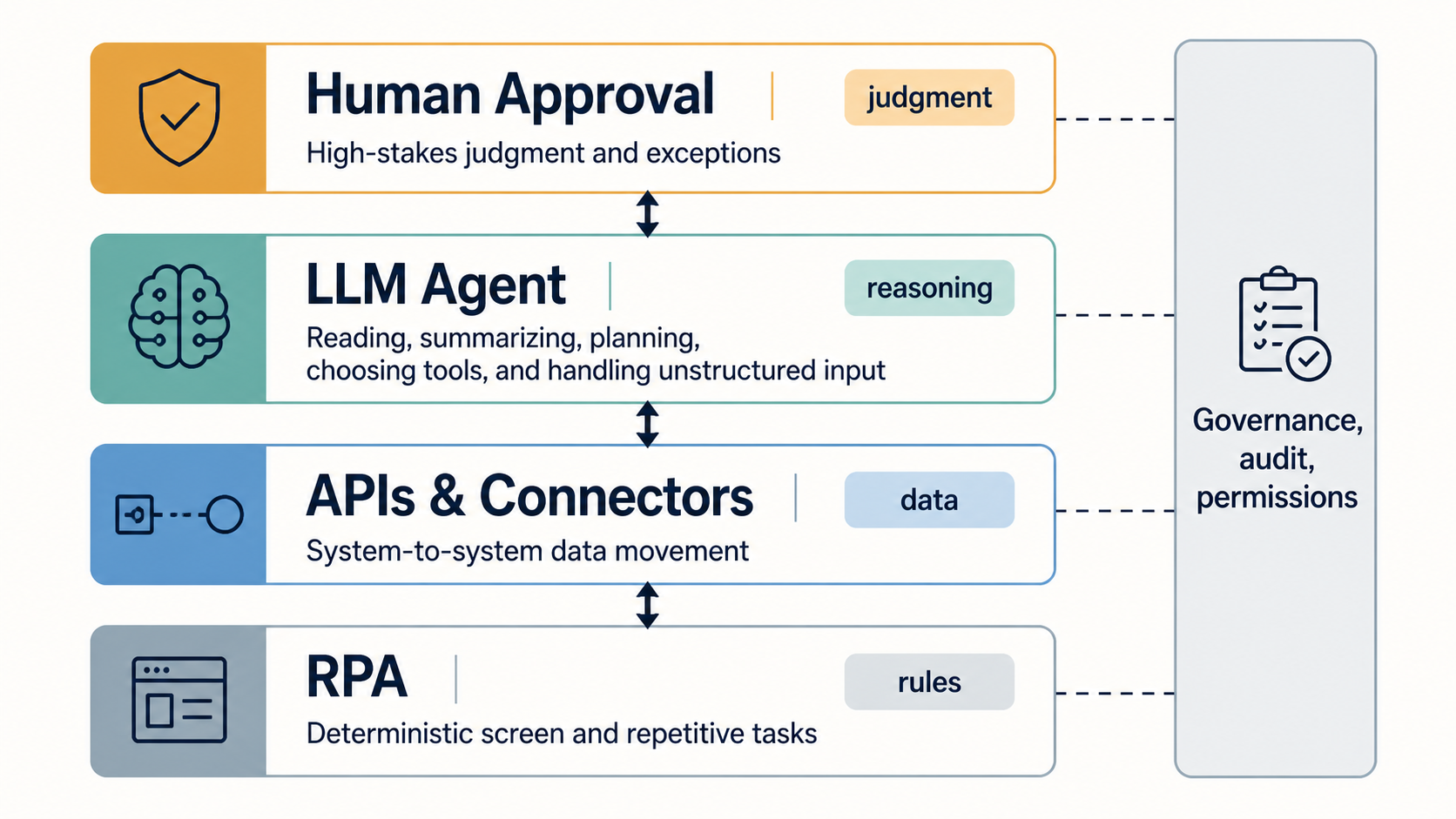
A layered diagram showing RPA, APIs and Connectors, LLM Agent, and Human Approval under shared governance, audit, and permissions

<The boundary between RPA, APIs, LLM agents, and human judgment 2.1>

Claude is better understood as a catalyst that widens the top of the automation market than as one RPA automation product competing with every incumbent. RPA can handle defined screen work, APIs can provide stable system-to-system paths, and an LLM agent can interpret unstructured input and plan the next action. The practical architecture combines all three.

The conditions for automating 90% of knowledge work

Cloud storage and file formats become the foundation

The success of agentic work depends at least as much on tools as on the model.

  • Google Drive, SharePoint, Dropbox, and similar cloud storage become shared locations for files and permissions.
  • Synced folders and desktop connectors reduce manual uploads when an LLM needs access to local files.
  • Word, Excel, PowerPoint, PDF, TXT, and Markdown tools and parsers provide the entry point for opening and understanding files. For region-specific formats such as HWP, teams must verify whether the connector or parser actually supports the format.
  • APIs, MCP, and shell scripts provide the exit path for sending results to another system or producing a new file.

Claude is not limited to reading files. Its file creation and editing capabilities include creating spreadsheets, presentations, documents, and PDFs. When the model that reads and summarizes a file is connected to the tools that produce and deliver the result, the subject-matter expert can focus on the purpose and approval rules instead of each product's menu.

Marketing plans and structured analysis move first

Consider a marketing plan: gather market material, list competitors, classify customer groups, write campaign hypotheses, draft a schedule and budget, then produce a report and presentation. The human still needs to define what should be investigated and which constraints apply. An agent can handle much of the reading and assembly.

I estimate that the document-writing and deliverable-production portion of a well-defined marketing plan can be about 90% automated. This does not mean that an entire campaign is 90% autonomously executed. People still need to verify current market numbers, competitor facts, budget assumptions, and legally sensitive language.

Analysis, summarization, planning, and production in a fixed format can reach a higher level of automation. If the input documents are sufficient, the output format is stable, and a human approval step exists before writing to an external system, I expect more than 95% of that production work to be automatable. This is a conditional estimate that varies with the organization, documents, and permissions.

Scheduled tasks in Claude Cowork turn recurring work into a product feature: summarize email, Slack, and calendar items each morning, or collect Drive material and create a weekly report. The unit of automation changes from “press this button” to “deliver this outcome every week.”

The next competition is security, governance, and judgment

What changes in government, legal, tax, and real-estate work

Public institutions, law firms, tax and accounting practices, and real-estate consultancies can benefit greatly from LLMs because they handle large volumes of text and high-value information. Their work often involves searching historical records, comparing context, drafting policies or opinions, and reporting in a prescribed format. Microsoft's AI Builder document-processing architecture also assumes a flow that receives documents, extracts information, routes review, and communicates the result while people handle exceptions.

These organizations cannot simply send every document to an external LLM. Personal information, confidential records, legal privilege, and sensitive government data may be involved, and an audit must show who accessed which document and which decision was made. Anthropic's Cowork safety guide distinguishes the risk of read tools from write tools and warns that scheduled tasks, browsers, and connectors can pass data across services, so permissions and human review must match the stakes.

In organizations that solve the security, regulatory, and audit problems, I expect much of the routine work currently performed by staff to become automated. “Ninety-five percent of staff become unnecessary” is not the point. The point is that people can be released from the repetitive work of copying, searching, organizing, and formatting, then spend more time on judgment and design.

The roles of idea-setter and document producer separate

In the past, policy and business-plan owners often spent nights searching old records, organizing ideas into documents, preparing drafts, and writing reports. In the future, finding and comparing historical context and generating multiple directions, prototypes, and report drafts will increasingly be automated.

People will spend more time choosing a better direction, applying real-world constraints, and testing whether the result will work in practice. The valuable skill shifts from making one polished document under pressure to judging many candidates and quickly validating a prototype.

Existing RPA and APIs do not disappear in this model. They become more important because an agent's decision still needs to be reflected safely in a business system through APIs, business rules, approval chains, and audit logs. The market is moving toward combining agent reasoning with the control of existing systems, not toward “one LLM does everything.”

The fact that an agent can read a document and call tools does not mean it should run unsupervised. Malicious instructions inside a document, excessive permissions, stale data, API errors, or hallucinations can lead to an unintended message, deletion, or policy decision. Separate read and write permissions, and keep human approval before external transmission and final reporting in sensitive workflows.

Summary

Claude changes the industrial landscape through more than better answers:

  1. Claude Code turns developers' file, command, and tool work into an agentic loop.
  2. Claude Cowork extends that architecture to non-developers working with documents, files, and cloud tools.
  3. RPA, APIs, document processing, and collaboration products are likely to move toward governed orchestration rather than simply disappear.
  4. Structured work can reach a high automation rate, but direction, accountability, security, and final approval are not automatically solved.

Companies that move early are redesigning workflows around AI instead of merely adding another tool. What does your company still copy, search, organize, and reformat by hand? If you can define the purpose, data access, and approval boundary, the first useful automation may be closer than it appears.

Monday, July 27, 2026

MoAI ADK and Harness Engineering 2 - A Human-Code-Zero Team

Series · MoAI ADK and Harness Engineering

Article series · Completed

Episode 2 · MoAI ADK and Harness Engineering 2 - A Human-Code-Zero Team

MoAI ADK and Harness Engineering 2 - A Human-Code-Zero Team

Using Claude Code business seats and a MoAI harness, my team reached 100% participation in AI-assisted development and zero manually typed production code. “Human code zero” does not mean zero human work or unreviewed automatic deployment. People define problems, approve designs and judge test evidence and operational risk. Agents produce and revise the code.

The harness in a real project

Modern web, current Spring Boot and Flutter cannot be governed by merely telling a model to understand the repository.

Harness asset Web Spring Boot Flutter
Domain contract User flow and visible state Aggregates, transactions and policies Screen state and offline policy
Interfaces API client and types OpenAPI, errors and events DTOs, serialization and deep links
Quality gates Lint, unit, E2E and build Format, unit, integration and build Analyze, test and build
Deployment contract Environment and static assets Container and DB migrations Signing and store flavors

Project analysis and domain-design documents form the spine. Coding guides, dependency rules, API contracts, CI/CD commands and branch, commit and PR policies attach to them. The model reads that context, creates a SPEC, implements in small increments and runs the validation recipe for each stack.

A team reviewing AI coding output and test evidence

<One hundred percent AI development means people move from code entry to ownership of evidence and risk—not zero human judgment.>

Claude Code seats are tools; team agreements are the operating system

Business seats give every team member access to a common coding agent. Seats alone merely multiply personal prompting styles. Repository-wide SPECs, commands, gates and review language produced repeatability.

Our workflow is:

  1. A person decides the outcome, constraints, acceptance criteria and risk.
  2. The agent reads code maps and domain documents, then proposes implementation and test plans.
  3. A person approves boundaries and data changes.
  4. The agent implements and iterates local verification.
  5. CI repeats the recipe in a clean environment.
  6. A person reviews requirement traceability, test evidence, security and operations—not only the diff.
  7. Deployment observations and incident lessons feed back into the harness.

This matches the role transition in our harness engineering analysis: problem decomposition, contracts, verification and feedback become the bottleneck, not typing speed. A vibe coding workflow that judges only the visible result loses those contracts and traceability.

Work humans must still absorb

AI authorship does not transfer accountability:

  • Analysis: customer problems, legal and security constraints, product priorities.
  • Design: domain boundaries, data ownership, failure isolation and maintenance cost.
  • Review: omissions, overimplementation, privilege escalation, privacy and licenses.
  • Testing: critical journeys, exploratory tests, devices, networks and recovery.
  • Operations: deployment approval, observability, rollback, incident command and communication.

If one AI writes a test and then passes its own test, the independence of the evidence is weak. People must determine whether the test proves the requirement, contains false positives and covers failure paths and nonfunctional conditions. Harness engineering closes the distance between “it compiles” and “the product operates safely.”

An engineer inspecting CI/CD evidence for web, backend and mobile

<Different web, backend and mobile checks must become one deployment contract.>

Fable 5 and the value of a harness for long work

Anthropic announced Claude Fable 5 on June 9, 2026 and restored global availability on July 1 after a temporary export-control suspension. The company positions it for ambitious, long-running coding and knowledge work, with planning, delegation and self-checking inside harnesses such as Claude Code.

Those are vendor claims, not a final independent benchmark verdict. In my operation, however, recent models do follow long instructions, role boundaries, test loops and prohibitions more reliably. Stronger models do not make harnesses obsolete. Their larger action radius increases the risk of completing the wrong objective very efficiently, so approval gates and observability matter more.

Community response: productivity versus cost and complexity

The official repository and ClaudeAI launch discussion praise SPEC-first work, TDD, specialist agents and repeatable team procedures. The objections deserve equal weight:

  • Specifications and orchestration slow down tiny changes.
  • Multi-agent context and repeated verification increase token cost.
  • Automatically expanding documents can preserve stale rules and create bureaucracy.
  • Framework convenience can turn model independence into runtime coupling.

A team should not impose one heavy process on everything. Use lighter gates for small fixes, standard gates for normal features and stricter approval for identity, payment or data changes. Delete unused context regularly.

Conclusion: the real productivity of human code zero

The achievement is not the number zero itself. Team members spend less time entering syntax and more time specifying requirements, evaluating changes and shortening feedback loops. A failed task should become a better SPEC, guide, test or CI rule—not remain one person's prompting trick—so the next model and teammate learn from it.

MoAI is not magic that builds the product for us. It is an AI development manual kit that makes team practice executable. The meaningful metrics are escaped defects, lead time, rollback rate, review time and requirement traceability, not generated lines of code. When people retain direction and accountability while agents execute, human code zero becomes reproducible engineering rather than reckless vibe coding.

MoAI ADK and Harness Engineering 1 - The AI Development Manual

Series · MoAI ADK and Harness Engineering

Article series · Completed

Episode 1 · MoAI ADK and Harness Engineering 1 - The AI Development Manual

MoAI ADK and Harness Engineering 1 - The AI Development Manual

I use a MoAI harness on projects that combine modern web applications, current Spring Boot services and Flutter apps. I first understood it as a collection of manuals for AI coding. Practice showed that this was only half the picture. Documentation is central, but a useful harness also decomposes work, constrains tools and uses test evidence to choose the next action.

The name needs one correction: in the official MoAI ADK repository, ADK means Agentic Development Kit, not AI Development Kit. It is a SPEC-first kit for organizing coding agents in a real repository, not a kit for training a new model.

One acronym, several different layers

Product or category Primary purpose Relationship to project code
MoAI ADK Development harness for specs, roles, workflows and verification Governs repository-wide development
Google ADK Build, evaluate and deploy user-facing agents Embedded in an application runtime
OpenAI Agents SDK Tool use, handoffs and traces Embedded in Python or TypeScript apps
Microsoft Agent Framework and LangGraph Stateful multi-agent workflows Service execution frameworks
Claude Code, Codex and Gemini CLI Coding agents that inspect and modify repositories Engines that execute harness rules

MoAI and Google ADK therefore should not be compared as direct substitutes. The latter helps build an agent inside a product. MoAI constructs the workshop around agents that build the product. Claude Code is the worker; MoAI is the procedure, blueprint and inspection station.

A development team organizing architecture and domain rules

<A harness begins with agreed domain and architecture, not a prompting trick.>

Four layers turn manuals into a harness

The practical structure has four layers:

  1. Knowledge: product goals, structure, stack, domain model, database and code maps.
  2. Contracts: SPECs, acceptance criteria, coding guidance, architecture boundaries and Git rules.
  3. Execution: plan, implementation, repair, review, E2E and synchronization commands invoking specialist agents and tools.
  4. Verification: builds, static analysis, unit, integration and E2E tests plus quality gates.

Documents alone can be acknowledged and then forgotten by a model. Tests alone can encourage an agent to chase green output without understanding the design. Declarative guidance and executable verification must work together.

A development workspace connecting documents, code, tests and Git

<Documents form the control plane; builds, tests and Git make its rules executable.>

Why SPEC-first is stronger than a prompt

A prompt disappears into a conversation. A SPEC stays in the repository. Breaking requirements into scenarios, domain rules, affected components, tests and acceptance evidence lets another session or model begin from the same contract.

Instead of “implement order cancellation,” a harness can define:

  • state transitions and refund responsibility before and after settlement;
  • dependency direction across Spring Boot application, domain and infrastructure layers;
  • an API schema and errors shared by web and Flutter clients;
  • migration, retry and idempotency requirements;
  • completion criteria for unit, integration, contract and UI tests.

This does not eliminate agent freedom. It separates the area available for exploration from boundaries that must not break, addressing the structural weakness discussed in our vibe-coding analysis.

How MoAI relates to harness engineering

Harness engineering treats agent performance as more than a model score. Context delivery, tools, persistence, observability, verification and recovery form a runtime system. Research such as AI Harness Engineering and observability-driven harness evolution now treats that system as an engineering object.

MoAI applies the idea to a development repository: context maps locate evidence, session state survives longer work, and checklists plus self-verification expose failure. Language-aware tools and scaffolding-first workflows support the loop. Agent and skill counts change across releases; the stable point is the closed cycle of specification, implementation, verification and documentation synchronization.

How model-independent is it?

MoAI's strongest idea is investing in project memory rather than one model. Domain documents, SPECs, architecture decisions, tests and Git history survive a move between coding agents. This repository, for example, keeps Claude Code assets as the source of truth while a Codex adapter reads the same instructions.

“Completely independent” would still be an exaggeration. Command syntax, hooks, context capacity, team-agent features and permissions differ by runtime.

Precise assessment: knowledge, contracts and verification are model-independent; commands, hooks and tool invocation need adapters.

That division preserves team assets when model fashions change. It also explains why a repository contract should precede adoption of Claude Code or a GitHub Copilot agent workflow.

Part 2 examines how our team reached 100% AI-assisted development and zero manually typed production code, along with the analysis, review and testing that humans must still own.

Thursday, July 23, 2026

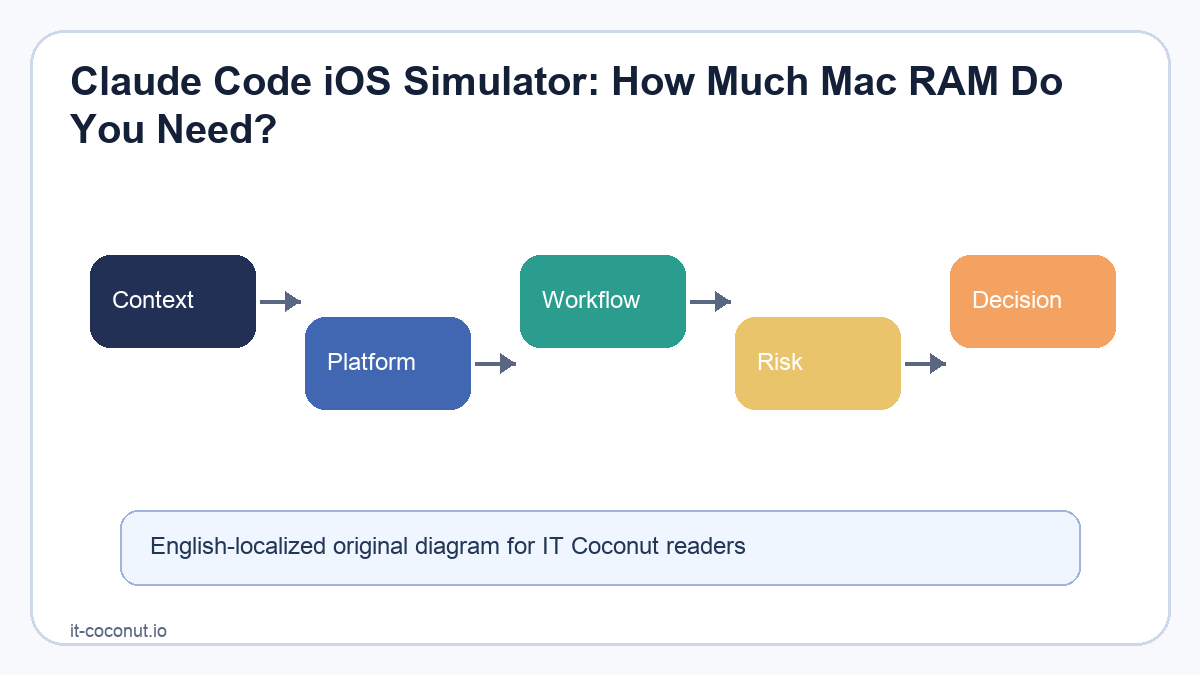
Claude Code iOS Simulator: How Much Mac RAM Do You Need?

Claude Code moving closer to iOS Simulator workflows changes the practical feel of AI-assisted app development. The model is not suddenly running all inference on your Mac; much of that still happens in the cloud. The local pressure comes from Xcode, iOS Simulator, dev servers, IDEs, browsers, databases, and the files being rebuilt while the assistant iterates.

That distinction matters when people ask how much RAM they need. The right question is not “How heavy is Claude?” It is “How much local development environment can I keep alive while an AI coding loop is building, launching, and checking screens?”

A workflow diagram showing Claude Code receiving a task, editing files, building in Xcode, launching iOS Simulator, checking the screen, and revising code

<Claude Code and iOS Simulator validation loop 1.1>

Why simulator access matters

Key details at a glance

Reader question Practical takeaway
What this article explains Claude Code iOS Simulator: How Much Mac RAM Do You Need?
Core SEO focus Claude Code iOS Simulator, MacBook RAM for Xcode, AI coding on Mac
How to read it Separate the durable signal from vendor messaging, short-term hype, and implementation friction.
iOS apps are not finished when they compile. Onboarding can be clipped, permission screens can lead to the wrong state, navigation can break after a tap, and a layout that looks fine in one device size can fail in another. A coding assistant that can work inside the simulator loop can shorten the distance between code changes and visible feedback.

The safety rule is straightforward: use test accounts, dummy data, and narrow tasks. If a simulator screen can be inspected by an AI tool, real customer data and private account information should not be present.

A Mac RAM guide comparing 16GB, 32GB, 48GB, and 64GB setups for Claude Code, Xcode, iOS Simulator, two development servers, an IDE, and a browser

<Mac RAM headroom for AI-assisted iOS development 1.2>

Practical RAM guidance

For lightweight web work, 16GB can still be usable. For Xcode plus iOS Simulator plus two local servers and a browser, it becomes tight. A 32GB MacBook is the sensible floor for sustained app development. 48GB gives more comfort for Docker, databases, and multiple simulators. 64GB is not required for everyone, but it is easy to justify if the machine is also used as an always-on development workstation.

The best workflow is scoped: ask for one screen, one bug, or one flow; run the build; inspect the result; then continue. Claude 4 agentic coding is most useful when the human still defines the acceptance criteria.

For readers comparing search terms, this article is also relevant to Xcode Simulator workflow.

Primary sources

Related reading

For broader context, read AI coding agents.

A second useful reference is vibe coding.

Readers following the infrastructure side may also want the earlier Claude 4 agentic coding overview.

Claude 4 Agentic Coding: Long-Running AI Workflows

Claude 4 agentic coding is worth watching because it changes what developers can delegate. The story is not only that a model writes better code. It is that a model can stay with a task longer, use tools, keep context, and return work that a human can inspect.

Anthropic’s Claude 4 announcement presents Claude Opus 4 and Claude Sonnet 4 as models built for coding, advanced reasoning, and agentic tasks. The practical question for software teams is narrower: where can a long-running coding agent help without weakening review, security, or maintainability?

A diagram showing a software task moving through AI reasoning, tool use, file changes, tests, checkpoints, and human review

<Long-running coding work with review checkpoints 1.1>

From short answers to sustained coding work

A traditional coding assistant gives a suggestion near the cursor. A Claude Code workflow can be broader: understand a repository, inspect files, edit code, run checks, and summarize what changed. Anthropic’s Claude Code overview positions the tool as an agentic coding assistant that works from the terminal and can operate across a project.

That shift fits the wider move from interactive assistance to Software 3.0. Developers still need to understand the system, but more of the routine motion can be delegated. The job becomes setting scope, supplying context, checking results, and deciding what should be merged.

The appeal is obvious. Long tasks often fail because humans lose time to repetitive search, boilerplate edits, test runs, and context switching. An agent that can handle those steps may shorten the path from issue to reviewed change.

What tool use changes in AI coding

Tool use in AI coding is the difference between a model that merely describes a fix and a system that can attempt one. Once a model can inspect files, run commands, and revise its answer, the workflow becomes closer to a junior developer preparing a change for review than a chatbot answering a question.

That makes the surrounding rules more important. A safe setup should define:

Workflow layer Practical guardrail
Task scope Keep work small enough to review in one sitting.
Repository access Limit which files and branches the agent can change.
Execution rights Separate harmless checks from actions that affect production.
Review evidence Require diffs, test output, and a clear explanation of trade-offs.

Anthropic’s Claude 4 model card also matters here because stronger agentic behavior raises safety questions. Better coding ability is useful only when paired with policies for sensitive data, tool access, and human approval.

Where Claude 4 can help most

The strongest early candidates are jobs with concrete feedback. Test repair, dependency upgrades, documentation maintenance, small refactors, log investigation, and codebase Q&A are all areas where a reviewer can compare output against evidence.

More ambiguous work needs caution. Product logic, security boundaries, data handling, and architecture decisions often require business context that is not fully written in the repository. In those cases, Claude 4 agentic coding may still help by gathering options, but it should not become the final decision-maker.

This is also where vibe coding and professional engineering part ways. Quick experimentation is useful, but production software needs durable understanding. The stronger the agent, the more important it becomes to know what it changed and why.

Limits and adoption checkpoints

The first limit is review bandwidth. A model can generate work quickly, but someone must still verify the design, read the diff, and interpret failures. Teams with weak tests may not gain as much as they expect.

The second limit is context quality. A long-running coding agent can only act on the context it can see: tests, docs, code comments, issue descriptions, architectural rules, and examples. If those are missing or stale, the model may produce plausible work that does not match the real system.

The third limit is responsibility. If an AI-assisted change breaks production, the accountability belongs to the team that approved it. That means organizations need audit trails, code ownership, rollback plans, and clear rules for which tasks agents may attempt.

The concise takeaway is that Claude Code workflow is not a replacement for engineering discipline. It is a way to make engineering discipline more scalable. Claude 4 agentic coding becomes valuable when long-running AI work is paired with small scopes, explicit tool limits, and human review that is strong enough to say no.

Key sources

404 Dev Room 30 - Taming

Series · 404 Dev Room Webtoon · Ongoing Episode 30 · 404 Dev Room 30 - Taming The trainer in the AI coding room has changed. <...