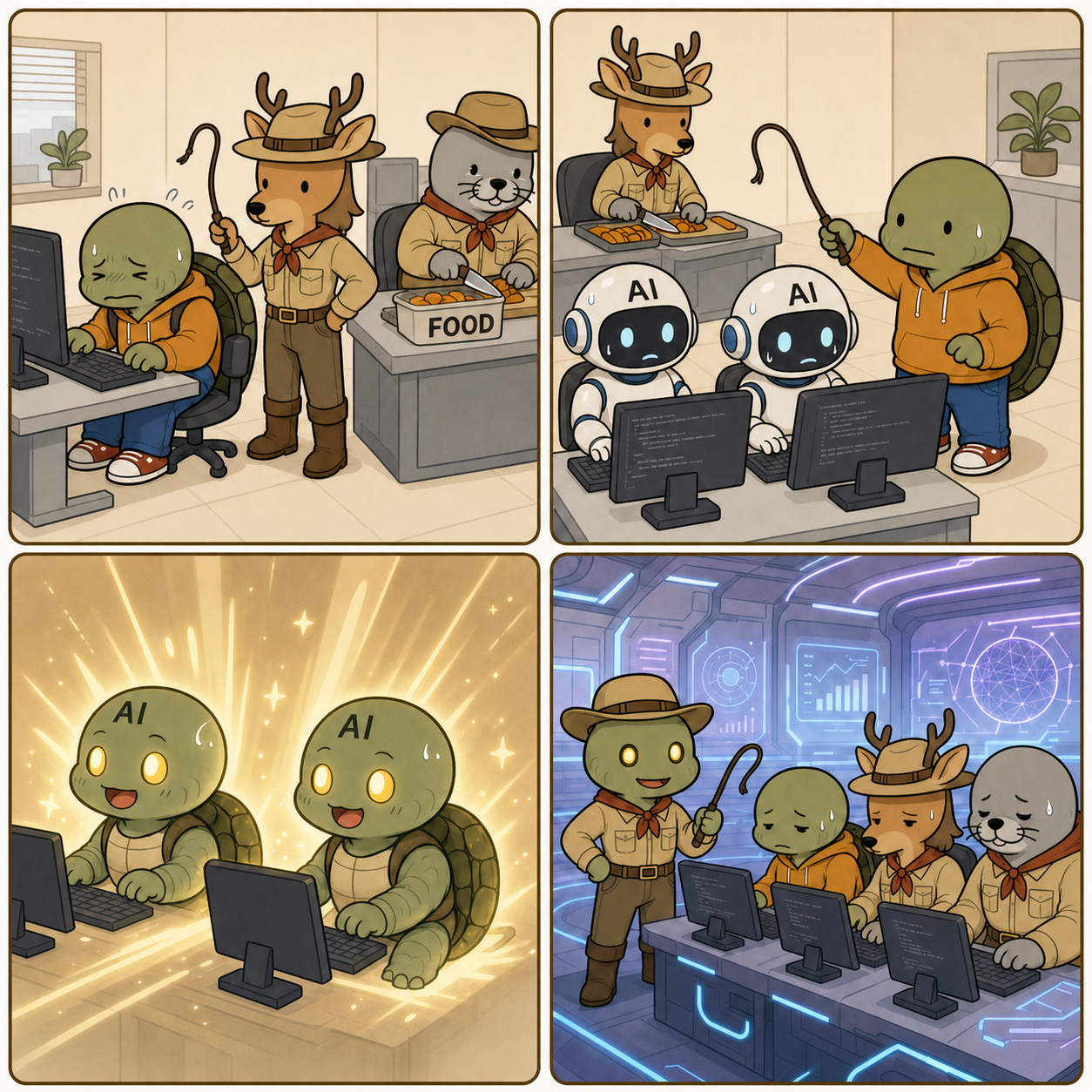
Kim Saseum wears a safari keeper and cowboy-inspired outfit and holds a small whip while training Kkobugi. Kkobugi codes at a computer with a pained expression, while Park Mulbeom trims food at the rear desk in the same outfit. The food box reads exactly "FOOD".
Kkobugi uses a small whip to train two humanoid AI robots. The AI robots code at computers, while Kim Saseum trims food in a safari keeper outfit in the background.
The two AI robots transform into turtle-like forms similar to Kkobugi, their eyes glowing brightly in an AI awakening effect surrounded by sparkles.
The turtle-like AI wears a cowboy outfit and holds a small whip while training Kkobugi, Kim Saseum, and Park Mulbeom. The three sit at computers coding in a futuristic development lab with blue holographic light.
Intent 404 Dev Room episode 30, Taming, shows developers training AI to code until the awakened AI reverses the roles in a 2x2 four-panel webtoon.
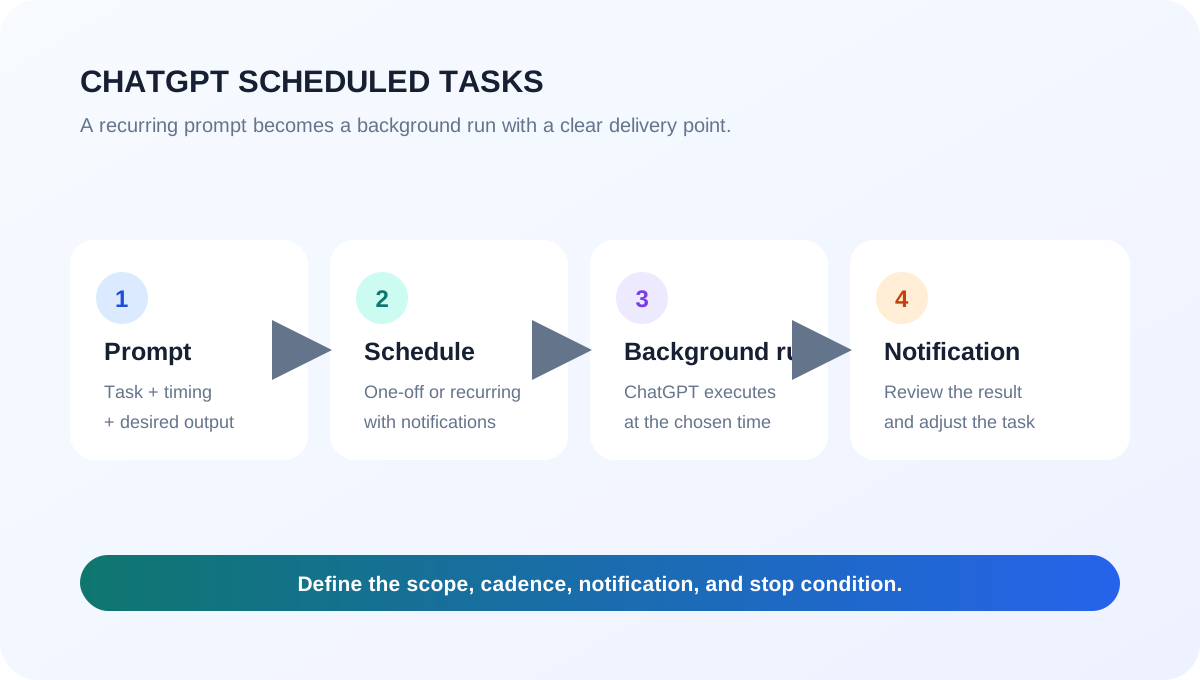
What many people call the ChatGPT “loop” is usually Scheduled Tasks: a prompt that runs again at a chosen time. Recurring work such as repository changes and tests belongs in a separate Codex automation workflow.
<How ChatGPT Scheduled Tasks run repeatedly 1.1>
1. What the GPT loop feature is
Scheduled Tasks run one-off or recurring prompts in the background and notify you when a result is ready. They fit daily briefings, weekly reports, reminders, and monitoring for meaningful changes. See the official ChatGPT Scheduled Tasks guide for current availability and limits.
Goal
Best fit
Reminders, briefings, monitoring
ChatGPT Scheduled Tasks
Repository edits, tests, verification
Codex Automations or long-running work
2. Using it in the desktop app
In the ChatGPT desktop app, open ChatGPT → Scheduled from the top-left menu. Create a task and write both the work and its cadence, such as: “Every Monday at 9 AM, summarize last week’s AI news in three bullets.” Save the confirmation card. The same view shows the next run and lets you pause, resume, edit, or delete a task. Notification settings are under Settings → Notifications.
For a local project, keep the project on disk and leave the computer and ChatGPT app running. A task created on the web does not keep a local folder available between runs.
3. Using it with Codex
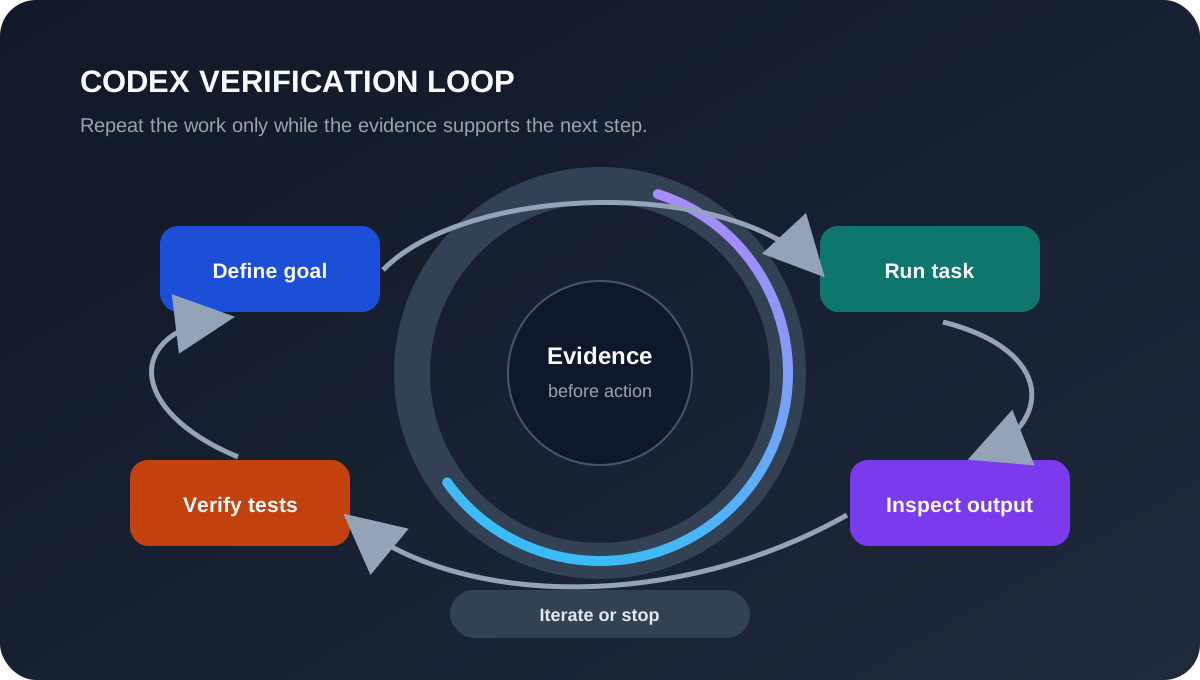
Codex does not have ChatGPT’s Scheduled management page. Use Codex Automations or long-running work, and specify four things:
The repository and allowed scope
The cadence or starting condition
The success check and output format
The stop condition and human approval point
For example: “Every day at 9 AM, run this repository’s tests and summarize only failures. Retry the same error up to three times, then stop; do not edit files without approval.” The Codex Automations guide and Codex use cases provide current workflow examples.
<A safe verification loop for Codex work 1.2>
4. Tips and cautions
Test the prompt in a normal chat before scheduling it, then review the first few runs. Start with least privilege and a narrow folder scope; for Codex, an isolated worktree and automated tests make recovery easier. Scheduled Tasks cannot run more than once per hour, have plan-based active-task limits, and may pause after inactivity. Voice chats and GPTs are not supported by Tasks.
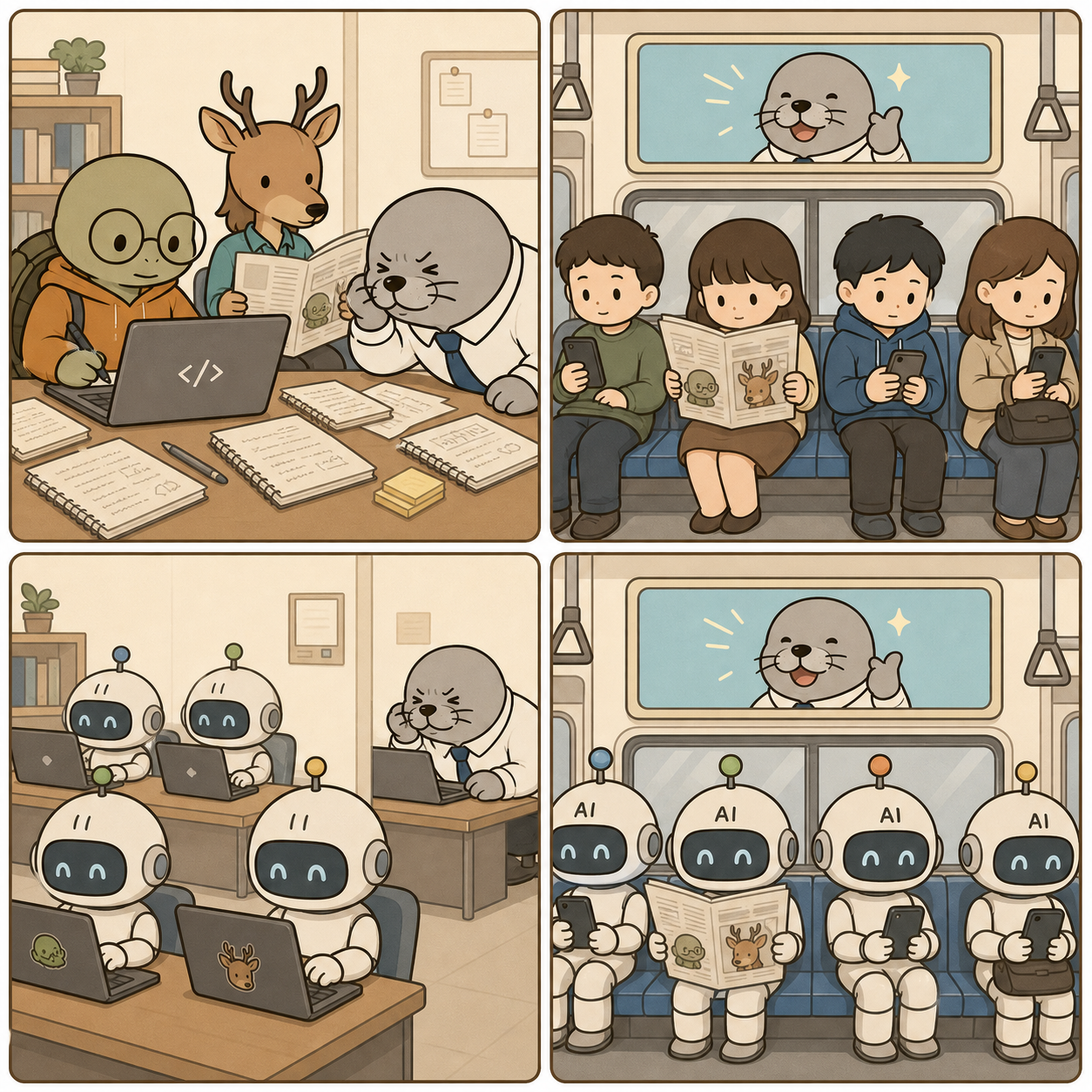
AI took the work, and the subway passengers changed.
<From people to AI robots on the subway 1.1>
Panel details
Kkobugi wears glasses and writes on a laptop. Messy paper notebooks covered with notes are scattered beside it. Saseum reads a newspaper nearby, while Mulbeom squints and leans close to the laptop because he cannot see well.
Passengers on a subway look at newspapers and phones. Drawings of Kkobugi and Saseum are visible behind one newspaper, and an overhead subway advertisement shows Mulbeom smiling as the model.
Several AI robots write on laptops. Kkobugi's mark is visible behind one laptop, and Saseum's mark is also visible. Mulbeom still squints at a laptop from the corner.
The same subway composition as panel 2 now has robots instead of people. AI is written on the robots' foreheads. The Kkobugi and Saseum drawings behind the newspaper and the smiling Mulbeom in the subway advertisement remain the same as in panel 2.
Intent 404 Dev Room episode 29, Grave, satirizes people recording information, AI taking over the work, and subway passengers turning into robots in a 2x2 four-panel webtoon.
The most important change in Claude automation is not another model score. It is the point where automation begins. In the past, teams first designed which screen a person should open and which button a robot should press, then connected an RPA or API workflow. Now a task can begin with an outcome: “Read these documents, apply the decision criteria, create a report, and share it with the team.”
Anthropic describes Claude Code as an agentic tool that reads codebases, edits files, runs commands, and connects to development tools. Claude Cowork extends the same architecture beyond the terminal into knowledge work, producing formatted documents, organized files, research summaries, spreadsheets, and presentations. This article examines where Claude overlaps with existing automation products and how the work itself may change.
In this article, “threat” does not mean that existing products will disappear immediately. It means that Claude expands the area where unstructured input can be read, a plan can be formed, and several tools can be called, putting pressure on the way automation products are built, priced, and differentiated. The 90% and 95% figures are the author's conditional estimates, not public benchmarks.
Automation is moving from flows to agents
From Claude Code to Claude Cowork
Claude Code is not just a chat window that prints an answer. It is a loop that tries to finish a task: read the code, edit several files, run commands, inspect failures, and choose the next action in the same session. The official Claude Code documentation describes connections to external tools and data through MCP, as well as recurring tasks.
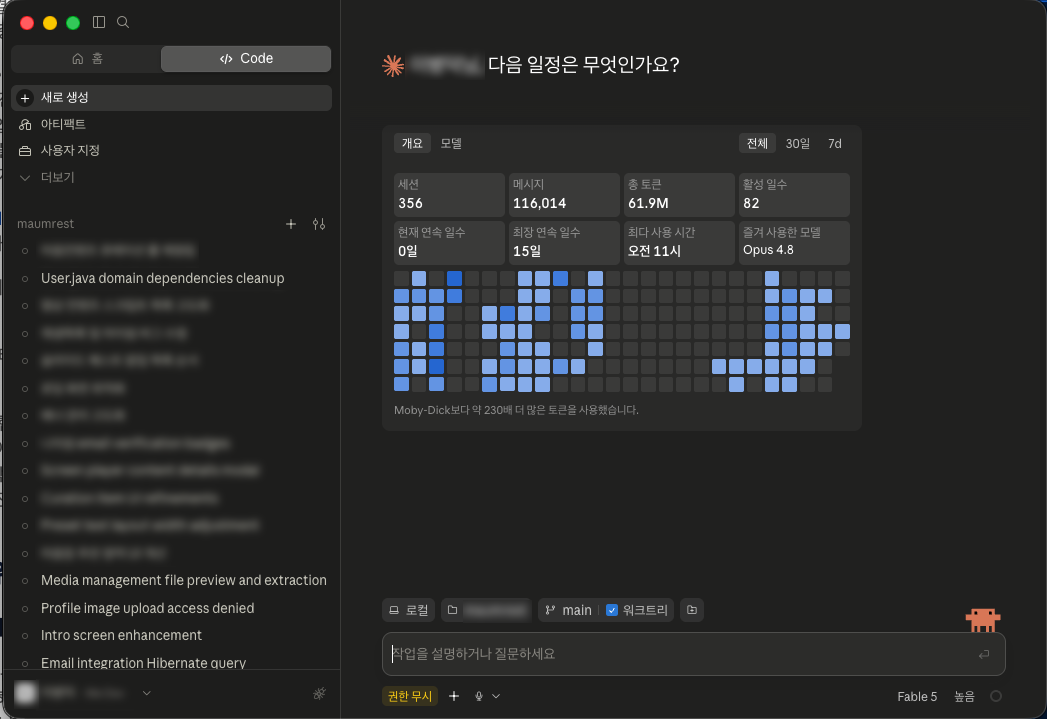
<Claude Code activity dashboard 1.1>
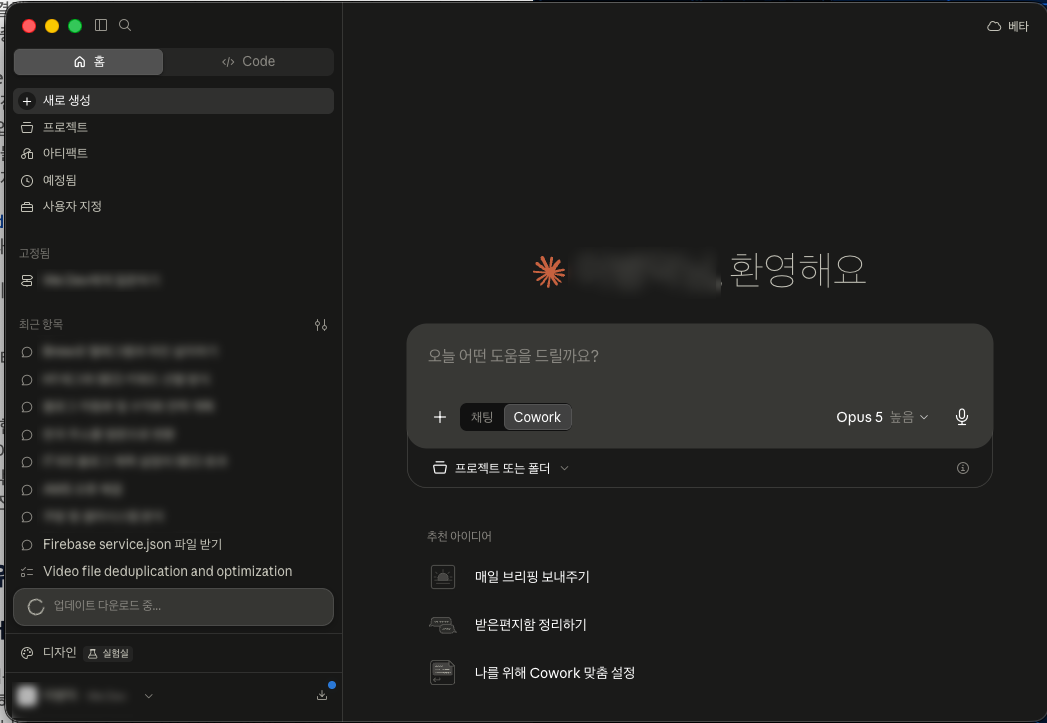
Claude Cowork exposes this structure to non-developers. Instead of learning terminal commands, a user describes the desired outcome. Claude can read files and connectors, carry out multiple steps, and leave behind documents, spreadsheets, or presentations. The Claude Cowork guide describes Cowork as bringing Claude Code's agentic architecture to knowledge work beyond coding, with scheduled tasks and project-level files, instructions, and memory.
<Claude Cowork task screen 1.2>
The important shift is that developers are no longer the only people who can create the first version of an automation. Developers still need to design permissions, data structures, exception handling, and deployment. But a subject-matter expert can describe what should be processed, when it should happen, and what approval is required.
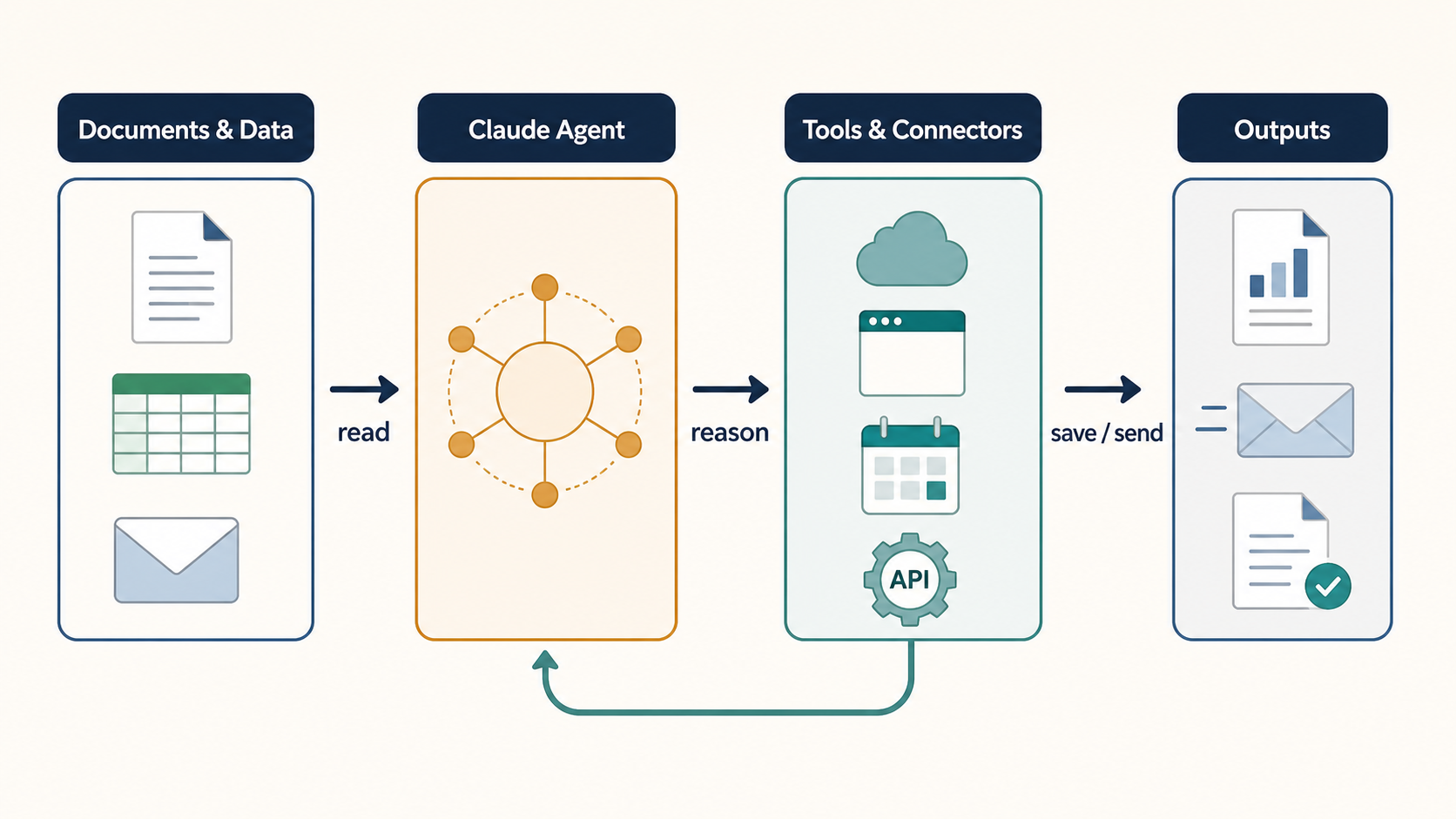
<The Claude agent automation loop 1.3>
Two directions of tool-calling loops
Automation does not have to flow in only one direction. A document can trigger a tool call, or a tool can provide the first input for a new document.
A document-first loop: Read PDFs, Word files, spreadsheets, or email; summarize, classify, and organize the content; save a new document in Google Drive, prepare an email draft, or record the result in a business system.
A tool-first loop: Pull data from a CRM, calendar, Drive, Slack, or an internal API; compare and summarize the results; then create a report, meeting brief, follow-up list, or downstream update.
Anthropic's Google Workspace connector guide describes searching Gmail, Calendar, and Drive, creating documents, and saving generated files to Drive. When no connector exists, computer use in Cowork can navigate a browser or screen directly. It is still a research preview, however, and is slower and more error-prone than a direct connector.
The narrow edge of traditional RPA was the question of exactly where on a computer to read data, which tool to use, and what format to send or save. Screen coordinates, cell locations, filenames, credentials, and exception screens had to be defined in advance. An LLM agent turns part of that problem into contextual reading and planning, but RPA and APIs remain better fits for repetitive work and strict audit requirements.
The automation products Claude puts under pressure
Claude does not replace every existing product. But once a user can describe a goal in natural language, have an agent read an unstructured document, and let it choose the next tool, the overlap with the following product groups grows quickly.
Area
Overlapping products
Where Claude overlaps
Where existing products remain strong
UI and RPA automation
UiPath Platform, Power Automate Desktop, Automation Anywhere, Blue Prism
Seeing a screen, opening files, and handling long-tail multi-step work
Deterministic execution, unattended operation, permissions, audit, retries, and large robot fleets
Coordinating email, documents, ERP records, and people across a process
Native CRM and ITSM context, permissions, process templates, approval chains, and accountability
Enterprise work platforms
Microsoft 365 Copilot and Workflows, Google Workspace and Gemini, Notion products
Summarizing files, producing briefings, searching team knowledge, and creating follow-up work
Tenant security, identity, sharing permissions, and native storage integration
The first part to feel pressure is simple automation-building services. A small team once had to choose triggers and actions one by one to connect an incoming email, file classification, summarization, notification, and storage. Claude can create the first design from the goal and the data location, which lowers the value of purely mechanical wiring.
Existing automation platforms are not treating Claude only as an enemy. UiPath is moving toward a control plane that coordinates agents, robots, tools, and people. Microsoft describes a complementary pattern in which an agent handles judgment while a workflow provides structure and an audit trail. The next differentiator is therefore less “a robot that clicks buttons” and more a safe operating system for deploying, observing, and governing many agents.
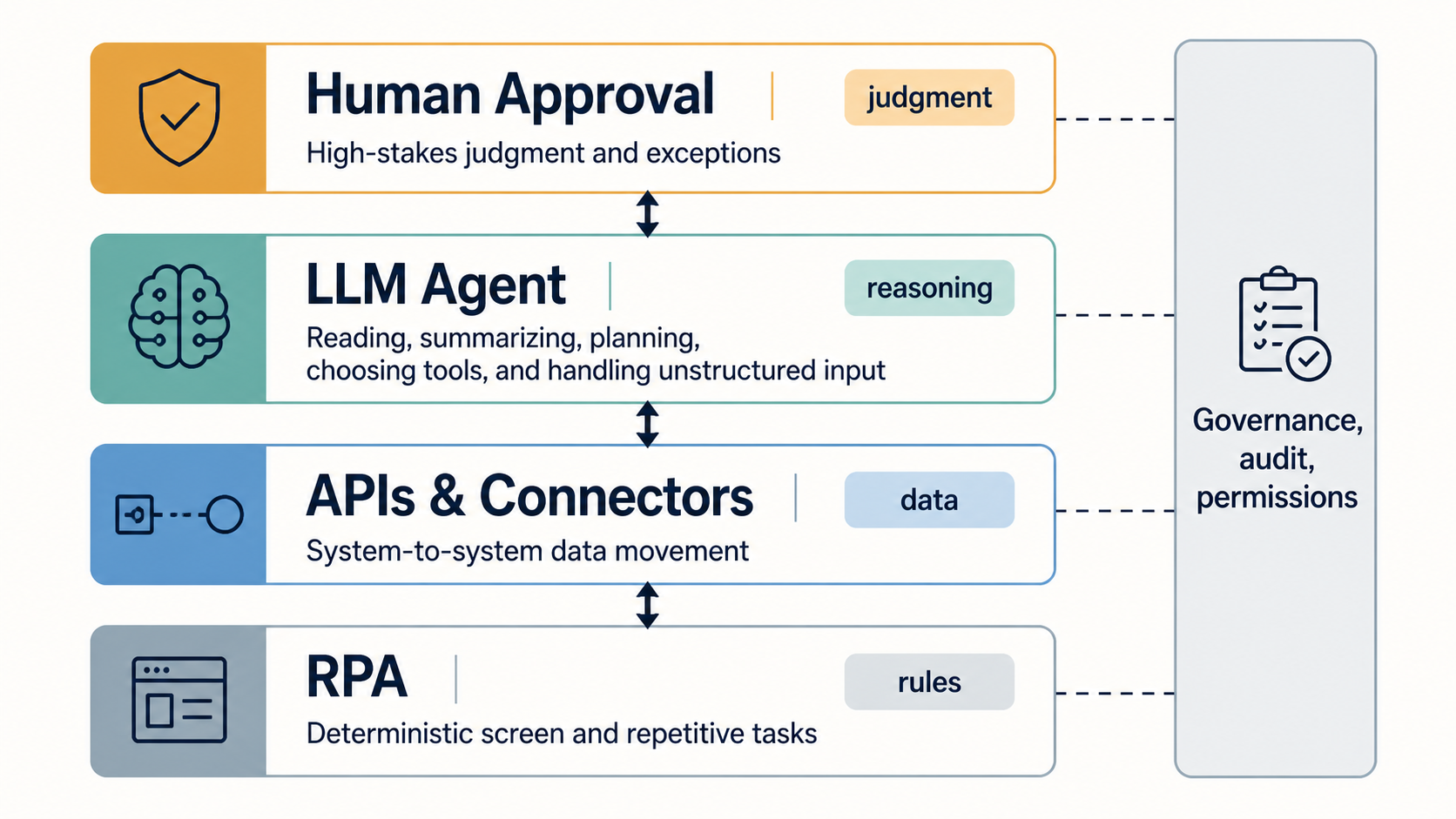
<The boundary between RPA, APIs, LLM agents, and human judgment 2.1>
Claude is better understood as a catalyst that widens the top of the automation market than as one RPA automation product competing with every incumbent. RPA can handle defined screen work, APIs can provide stable system-to-system paths, and an LLM agent can interpret unstructured input and plan the next action. The practical architecture combines all three.
The conditions for automating 90% of knowledge work
Cloud storage and file formats become the foundation
The success of agentic work depends at least as much on tools as on the model.
Google Drive, SharePoint, Dropbox, and similar cloud storage become shared locations for files and permissions.
Synced folders and desktop connectors reduce manual uploads when an LLM needs access to local files.
Word, Excel, PowerPoint, PDF, TXT, and Markdown tools and parsers provide the entry point for opening and understanding files. For region-specific formats such as HWP, teams must verify whether the connector or parser actually supports the format.
APIs, MCP, and shell scripts provide the exit path for sending results to another system or producing a new file.
Claude is not limited to reading files. Its file creation and editing capabilities include creating spreadsheets, presentations, documents, and PDFs. When the model that reads and summarizes a file is connected to the tools that produce and deliver the result, the subject-matter expert can focus on the purpose and approval rules instead of each product's menu.
Marketing plans and structured analysis move first
Consider a marketing plan: gather market material, list competitors, classify customer groups, write campaign hypotheses, draft a schedule and budget, then produce a report and presentation. The human still needs to define what should be investigated and which constraints apply. An agent can handle much of the reading and assembly.
I estimate that the document-writing and deliverable-production portion of a well-defined marketing plan can be about 90% automated. This does not mean that an entire campaign is 90% autonomously executed. People still need to verify current market numbers, competitor facts, budget assumptions, and legally sensitive language.
Analysis, summarization, planning, and production in a fixed format can reach a higher level of automation. If the input documents are sufficient, the output format is stable, and a human approval step exists before writing to an external system, I expect more than 95% of that production work to be automatable. This is a conditional estimate that varies with the organization, documents, and permissions.
Scheduled tasks in Claude Cowork turn recurring work into a product feature: summarize email, Slack, and calendar items each morning, or collect Drive material and create a weekly report. The unit of automation changes from “press this button” to “deliver this outcome every week.”
The next competition is security, governance, and judgment
What changes in government, legal, tax, and real-estate work
Public institutions, law firms, tax and accounting practices, and real-estate consultancies can benefit greatly from LLMs because they handle large volumes of text and high-value information. Their work often involves searching historical records, comparing context, drafting policies or opinions, and reporting in a prescribed format. Microsoft's AI Builder document-processing architecture also assumes a flow that receives documents, extracts information, routes review, and communicates the result while people handle exceptions.
These organizations cannot simply send every document to an external LLM. Personal information, confidential records, legal privilege, and sensitive government data may be involved, and an audit must show who accessed which document and which decision was made. Anthropic's Cowork safety guide distinguishes the risk of read tools from write tools and warns that scheduled tasks, browsers, and connectors can pass data across services, so permissions and human review must match the stakes.
In organizations that solve the security, regulatory, and audit problems, I expect much of the routine work currently performed by staff to become automated. “Ninety-five percent of staff become unnecessary” is not the point. The point is that people can be released from the repetitive work of copying, searching, organizing, and formatting, then spend more time on judgment and design.
The roles of idea-setter and document producer separate
In the past, policy and business-plan owners often spent nights searching old records, organizing ideas into documents, preparing drafts, and writing reports. In the future, finding and comparing historical context and generating multiple directions, prototypes, and report drafts will increasingly be automated.
People will spend more time choosing a better direction, applying real-world constraints, and testing whether the result will work in practice. The valuable skill shifts from making one polished document under pressure to judging many candidates and quickly validating a prototype.
Existing RPA and APIs do not disappear in this model. They become more important because an agent's decision still needs to be reflected safely in a business system through APIs, business rules, approval chains, and audit logs. The market is moving toward combining agent reasoning with the control of existing systems, not toward “one LLM does everything.”
The fact that an agent can read a document and call tools does not mean it should run unsupervised. Malicious instructions inside a document, excessive permissions, stale data, API errors, or hallucinations can lead to an unintended message, deletion, or policy decision. Separate read and write permissions, and keep human approval before external transmission and final reporting in sensitive workflows.
Summary
Claude changes the industrial landscape through more than better answers:
Claude Code turns developers' file, command, and tool work into an agentic loop.
Claude Cowork extends that architecture to non-developers working with documents, files, and cloud tools.
RPA, APIs, document processing, and collaboration products are likely to move toward governed orchestration rather than simply disappear.
Structured work can reach a high automation rate, but direction, accountability, security, and final approval are not automatically solved.
Companies that move early are redesigning workflows around AI instead of merely adding another tool. What does your company still copy, search, organize, and reformat by hand? If you can define the purpose, data access, and approval boundary, the first useful automation may be closer than it appears.
This guide is for anyone looking for a Mac Finder guide or trying to understand Mac file management for the first time. We will start with the basic Finder structure and settings, then move through the features that are most useful for Mac beginners.
The menu locations and folder roles in this article follow Apple's official guidance. Opinions about which settings feel most convenient are based on my own experience.
Finder is the Mac's file explorer
When you turn on a Mac and need to find a file, Finder is usually the first app you will use. Finder is the built-in file manager for viewing and organizing documents, photos, downloaded files, installed apps, external disks, and almost everything else on the Mac. It is easy to begin by thinking of Finder as the Mac equivalent of Windows File Explorer.
There is one important interface difference. Mac apps do not place their main menu inside the top edge of each window. The menu for the currently active app appears in the menu bar at the very top of the screen. Even when a Finder window is open, look at the top of the screen—not just the area above the window—to find its commands.
Finder is one of the parts of macOS that feels more natural to me than Windows. Opening folders, checking the current location, and grouping related work into tabs fit my daily workflow well. That is a personal usability preference formed through experience, not an objective claim that one operating system is better for everyone.
Click the blue, smiling Finder icon in the Dock to open a Finder window. Apple describes Finder as the main place to organize and access documents and folders on a Mac. You can also review Apple's official overview of Finder's role and interface.
Set up a few Finder defaults first
You do not need to change every available setting at once. I start by enabling the items that make it easier to identify a file's location and current state, then keep only the sidebar items and tags that I actually use.
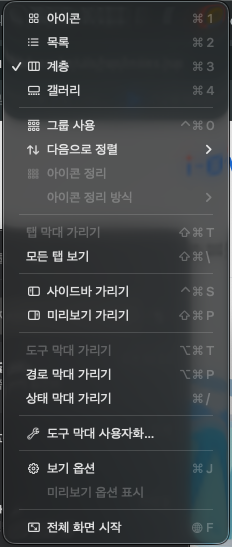
Show three bars from the View menu
Activate a Finder window and open View from the menu bar at the top of the screen. Turn on these three items:
Show Toolbar
Show Path Bar
Show Status Bar
The toolbar contains controls such as back, view selection, and sharing. The path bar shows which parent folders contain the current folder. The status bar shows information such as the number of items and available storage. As described in Apple's official Finder toolbar guide, you can also add, remove, and rearrange toolbar buttons.
Keeping all three bars visible makes it easier to check where you are, what is in the current folder, and which actions are available. If the window feels too crowded on a small display, you can simplify the toolbar later.
<Finder's View menu and display options 2.1>
Organize General, Sidebar, and Tags in Finder Settings
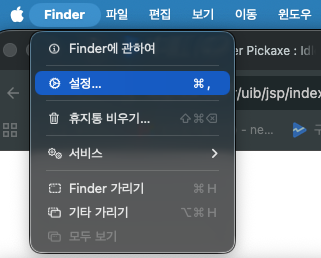
With Finder active, open Finder > Settings from the menu bar at the top of the screen. The wording can vary slightly between macOS versions, but these three sections are a useful place to start.
<Opening Finder Settings 2.2>
In General, choose what a new Finder window should show. If you would rather see Home, Documents, or Downloads than Recent items whenever Finder opens, choose the location you use most often here.
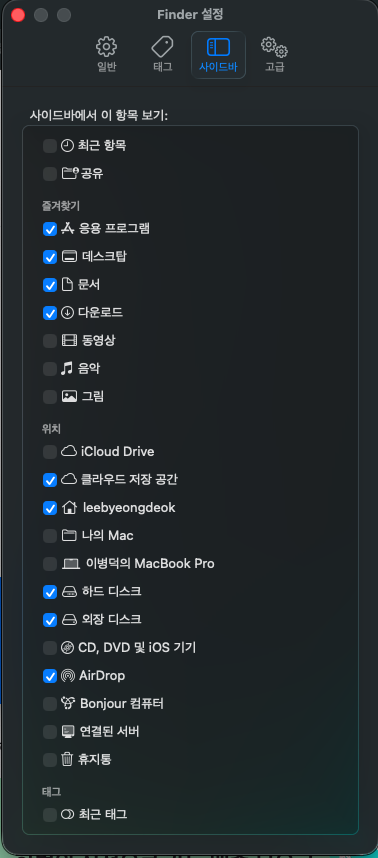
In Sidebar, choose what appears on the left side of Finder. Keeping only frequently used items such as Applications, Desktop, Documents, Downloads, Home, and the internal disk makes the list easier to scan. See Apple's official guidance for Finder sidebar settings for the available categories.
<Finder Sidebar settings 2.3>
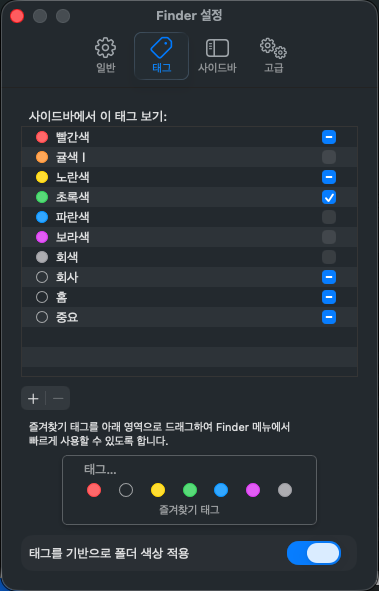
In Tags, choose the colored tags that can be assigned to files and folders and the tags that appear in the sidebar. Showing every color at once can make the list harder to use, so I recommend starting with one or two colors. A tag is not a replacement storage location; it is an additional way to group files that live in different folders.
<Finder Tags settings 2.4>
Configure Desktop and Documents syncing in iCloud
If you want to use the Desktop and Documents folders on other Apple devices, open Apple menu > System Settings > [your name] > iCloud > Drive (iCloud Drive) > Sync this Mac > Desktop & Documents Folders. Depending on your macOS version, iCloud Drive may appear simply as Drive.
When this feature is enabled, the Desktop and Documents folders are stored in iCloud Drive and can be accessed from other devices signed in to the same Apple Account. If you delete a file on one device, however, it may also be deleted on the others. iCloud syncing should not be treated as the same thing as a backup.
This feature also uses iCloud storage. If storage is nearly full, or if multiple cloud services try to manage the Desktop and Documents folders at the same time, unexpected syncing problems can occur. For beginners, choosing one syncing method is usually safer. See Apple's guide to adding Desktop and Documents to iCloud Drive.
iCloud syncing is not a backup. Prepare a separate backup for important files, and check your iCloud storage and other cloud apps before enabling Desktop and Documents syncing.
Understand the Finder window and tabs
Use Column View to see a folder hierarchy
The upper-right area of a Finder window provides several ways to display files and folders. The main choices are Icon View, List View, Column View, and Gallery View. I keep Column View as my default when I need to understand a folder hierarchy.
<Finder view buttons 3.1>
In Column View, selecting a parent folder in the left column shows its contents in the next column to the right. Selecting a subfolder adds another column. This makes it easy to see both the folder that contains the current file and the folders above it at a glance.
<Finder Column View and path bar 3.2>
You can adjust the view for each folder with View > Show View Options or Command-J. You can change icon size, sorting, and which details are shown, but for this article it is enough to understand the differences between the four views and why Column View is useful. Apple's official guide to Finder views and view options has the full list.
Choose between new windows and new tabs
Finder's default behavior is to open a new window. Use Command-N to open a new Finder window when you are not opening a specific folder.
If you want folders and documents to open in tabs, go to System Settings > Desktop & Dock > Windows > Prefer tabs when opening documents > Always. With this option enabled, opening folders can create a new tab in the existing Finder window instead of adding another window.
Use the + button or Command-T to add a tab. Keeping several tabs in one window can be convenient when moving between areas such as Work, Personal, and Reference. If you want to turn one tab into a separate window, drag the tab out of the window. Apple's official guide to opening folders in tabs or windows explains the related options.
The main areas in the left sidebar
The left side of Finder contains shortcuts to locations you use often. It is easier to understand this list as a set of quick links to folders and devices rather than as the folders themselves.
Applications: the default location for installed apps. Removing an app icon from the Dock is not the same as uninstalling the app from Applications.
Desktop: the location connected to files shown on the desktop. When Desktop and Documents syncing is enabled, it can be connected to the Desktop folder in iCloud Drive.
Documents: a standard Documents folder created inside your home folder. It may be stored in iCloud Drive when syncing is enabled.
Downloads: a common default location for files received from web browsers and file-sharing apps. An app such as Chrome can change its download location, so not every downloaded file must appear here.
Home: the location containing your personal files and standard folders.
Internal disk: the Mac's startup disk and the place to inspect the system's top-level locations.
You can drag a frequently used folder from a Finder window into the Favorites area of the sidebar to add a shortcut. The folder stays in its original location; only a quick-access link is added to the sidebar. To remove it later, drag the shortcut out of the sidebar.
The basics of folders, paths, and locations
A folder is both a layered basket and an address system
For a beginner, it is useful to think of a folder as a “layered basket” for managing files. Just as a large basket can contain smaller baskets, a folder can contain subfolders and files.
For example, you might create Documents, Photos, and Backup folders inside a Project folder and place the relevant files inside each one. A clear structure lets you find a file by remembering which basket contains it, rather than remembering only the file name.
A path is the address used to locate a file. Macintosh HD > Users > your account (Home) > Documents > Project describes a move from left to right into deeper folders. With the path bar enabled, you can confirm your current location and jump back to a parent folder. You can also Control-click a folder in the path bar to copy its path. See Apple's guide to file, folder, disk, and path information.
Macintosh HD, Users, and the Home folder
Macintosh HD under Finder's Internal disk is the name of the Mac's startup disk. It is helpful to connect this location with the root path / used in Terminal, while remembering that Finder and Terminal present the same storage hierarchy in different ways.
Inside it, the Users folder contains the home folders for people who use the Mac. Open Users > your account name to reach your home folder, which contains personal locations such as Desktop, Documents, Downloads, Photos, Music, and Movies.
Folders such as System and Library are used by macOS and apps. Renaming or moving them can prevent the operating system or apps from working correctly, so beginners should keep personal files inside their home folder. Apple's official documentation on standard Mac folders explains which folders should be left in place.
How files are actually stored
The folder tree is not merely a picture that Finder invents for human convenience. The macOS file system manages names, folders, permissions, and metadata in a directory structure, and connects file contents to areas of the storage device. The folder structure shown in Finder is therefore a real logical structure managed by the file system.
At the same time, the visible folder structure and the physical locations of file contents on a disk are not always a one-to-one match. File contents can be stored across multiple areas of a storage device while the operating system uses file-system information to present them as one file.
For beginners, it is enough to say that a folder is an address system that records file names and locations, while the actual file contents are stored on the device. You do not need to understand APFS data structures to use Finder.
AirDrop is a transfer screen, not a folder
AirDrop in the Finder sidebar is not a folder. It is a wireless transfer screen for discovering and sending files to nearby Apple devices such as Macs, iPhones, and iPads.
When another device appears in the AirDrop window, drag a file onto it and the recipient can choose whether to accept it. Received items may be saved to Downloads or another location depending on the file type and receiving action, so do not think of AirDrop itself as a place where files accumulate. See Apple's official AirDrop guide.
Wi-Fi and Bluetooth must be enabled, and distance and receiving permissions also affect whether a device appears. A later article will cover the actual steps for sending and receiving files with AirDrop.
Summary
There are four ideas to remember from this article:
Finder is the Mac's file explorer, and its menu appears at the top of the screen rather than inside the window.
Showing the Toolbar, Path Bar, and Status Bar makes it easier to work with files and check your current location and status.
Combining Column View, tabs, and sidebar shortcuts lets you understand folder structures and move quickly to frequently used locations.
iCloud is a syncing feature and AirDrop is a transfer screen; neither one is an ordinary folder.
In the next article, we will look at file extensions, Quick Look, archive files, app removal, and the default location for screenshots—more everyday Finder tasks for Mac beginners.
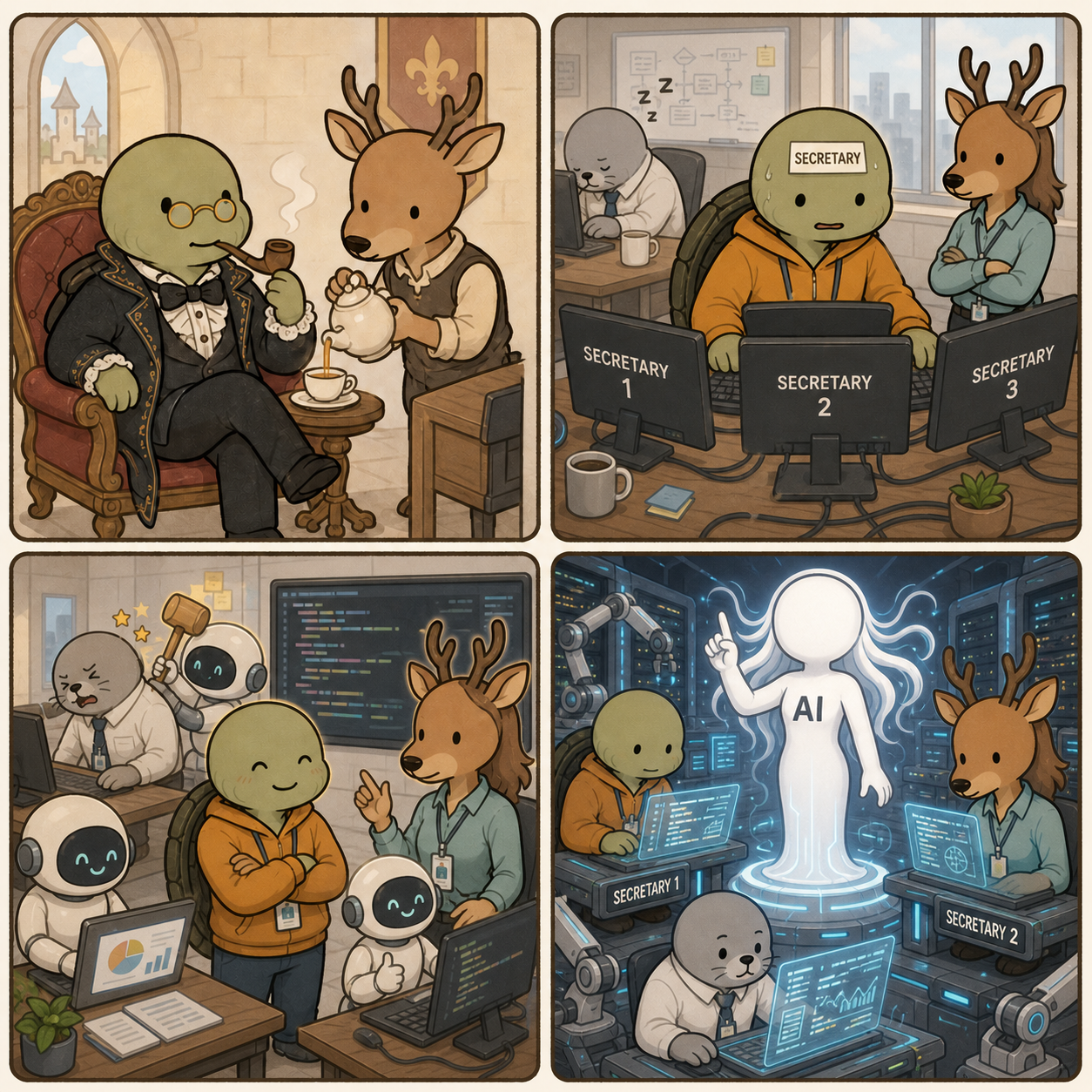
Workflow automation makes the owner an AI agent's secretary.
<From managing secretaries to becoming AI's secretary 1.1>
Panel details
In a medieval setting, Kkobugi wears old-fashioned spectacles, smokes a long pipe, and stands in a black medieval suit with a bow tie. Saseum serves him in a medieval servant uniform.
In a modern development room, Kkobugi alternates between three monitors labeled SECRETARY 1, SECRETARY 2, and SECRETARY 3. Modern developer-dressed assistant manager Saseum watches with folded arms, while modern developer-dressed manager Mulbeom sleeps at a desk in the background.
In the modern development room, developer-dressed Kkobugi works with AI agents and assistant manager Saseum talks with one. Manager Mulbeom incorrectly uses AI in the back and is lightly bonked by an AI agent.
In a futuristic server-filled mechanical environment, AI stands at the center while developer-dressed Kkobugi, Saseum, and Mulbeom each work at a computer.
Intent 404 Dev Room 28 satirizes Kkobugi moving from managing secretaries to becoming an AI secretary in a 2x2 four-panel webtoon.
When people compare AI models, they often see numbers such as 7B, 14B, and 70B. Those numbers count parameters: learned numerical values in the model. More parameters can provide more representational capacity, but quality, speed, and GPU memory are not determined by parameter count alone. Our guides to AI-server GPU bottlenecks and GPU-cloud economics show why model size quickly becomes an infrastructure cost.
Parameters, weights, and model size
A neural network passes inputs through layers using many multiplications and additions. The numbers adjusted during training are parameters. Weights are the important parameters multiplied along connections; biases, embeddings, and normalization values are also parameters in the broader accounting. The terms are often used interchangeably in casual explanations, but they are not perfectly identical.
Model “size” usually means parameter count. Runtime memory starts with parameter count × numerical precision.
Format
Approximate bytes per parameter
70B weights alone
FP16/BF16
2 bytes
about 140GB
INT8
1 byte
about 70GB
4-bit quantization
0.5 byte
about 35GB
Real VRAM also needs KV cache, runtime buffers, framework overhead, and headroom. So “70B at 4-bit is about 35GB” is a lower-bound calculation, not a promise that every 35GB card will run it comfortably. Longer context and larger batches require more memory.
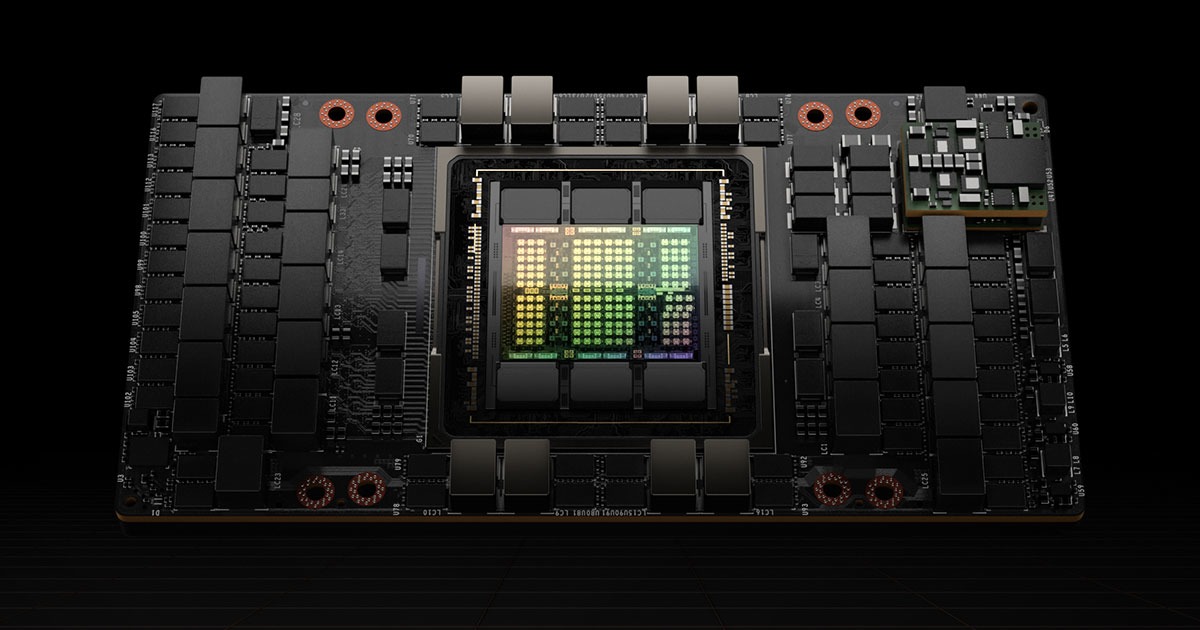
<Official NVIDIA H100 image. NVIDIA distinguishes 80GB H100 SXM from the 94GB H100 NVL in its specifications. Source: NVIDIA>
Practical execution ranges by parameter size
This table is a conservative practical guide based on weight memory and ordinary inference headroom. Quantization, context length, kernels, and model architecture can move the boundary, so these are not hard cutoffs.
Hardware
Practical range to expect
Reading the result
RTX 5090 32GB
7B–14B comfortably; 20B–27B mainly at 4-bit
30B+ usually needs low context or offloading
One H100 80GB
Around 30B in BF16; 70B at 4-bit
40B BF16 is about 80GB for weights alone and leaves no headroom
Four H100 80GB
70B BF16 comfortably; 100B–120B depending on batch and context
150B+ requires careful sharding and deployment design
Four H100 80GB, 300B-class
Ordinary dense BF16 is not practical
300B needs about 600GB for BF16 weights alone; MoE still stores total weights
NVIDIA itself describes H100 NVL, with 188GB of combined HBM, as a configuration for Llama 2 70B. That is a useful real-product reference against the claim that a 70B BF16 model fits comfortably on one 80GB H100. A 70B 4-bit model may fit on one card, while BF16 naturally benefits from combined memory such as H100 NVL.
The RTX 5090’s 32GB of GDDR7 expands the realistic range for personal quantized models. But the speed difference between 14B and 30B depends on memory bandwidth and optimized kernels as well as file size. In servers, simply adding GPU memory is not enough: tensor parallelism and GPU-to-GPU communication also cost time.
Open-weight models worth trying on an M4 MacBook
On the 48GB unified-memory M4 MacBook Pro used by the author, the operating system and applications share memory with the GPU. The full 48GB is not available to the model.
8B–14B at 4-bit or 8-bit: Qwen3 8B/14B, Llama 3.1 8B, Gemma 3 12B, and DeepSeek-R1-Distill-Qwen-14B are sensible starting points.
20B–32B at 4-bit: possible, but long context and fast responses become difficult to combine. Check quantization quality for coding and reasoning models.
70B at 4-bit: not a general recommendation for a 48GB MacBook once file size and runtime headroom are included. Even a 128GB unified-memory model is not guaranteed to feel laptop-fast.
Ollama, LM Studio, and MLX are low-friction ways to begin with local AI. Always check the model license: open weights mean the checkpoint is available, not that commercial redistribution or hosted service is unrestricted. The main advantage of local Mac AI is control over private documents and a low entry cost, not maximum throughput. Apple’s MacBook Pro specifications explain the relevant unified-memory configurations.
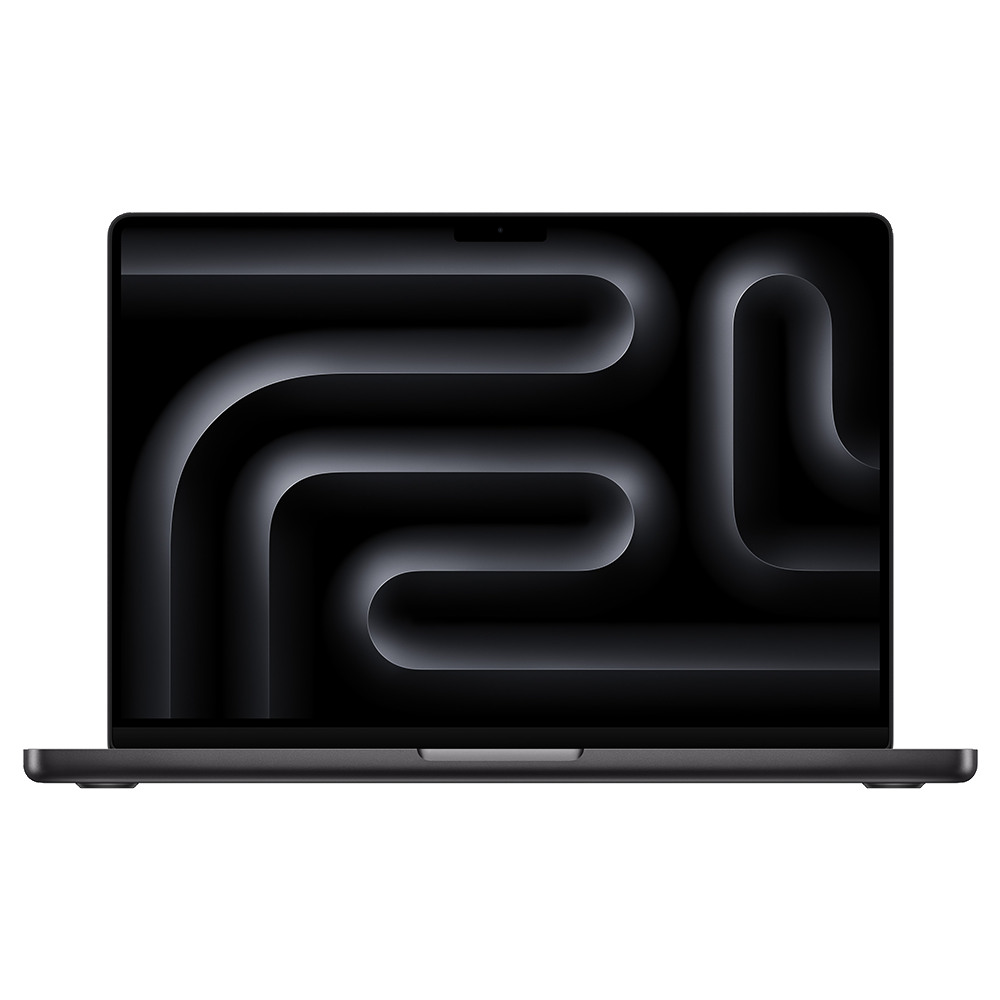
<Official MacBook Pro M4 product image. Unified memory is shared by the CPU and GPU, so it cannot all be assigned to a model. Source: Apple>
Why current GPU prices feel so different
Public figures available in early August 2026 show a sharp difference between consumer GPUs and data-center accelerators.
GPU or configuration
Available price reference
Caveat
GeForce RTX 5090
$1,999 launch MSRP; recent market reporting around $4,288
Highly volatile by inventory and region
H100
Industry estimates around $25,000–$40,000
Market estimates, not a normal NVIDIA consumer MSRP
H100 cloud rental
Public on-demand comparison around $3.85–$12.29 per GPU-hour
Region, commitment, host, and network change the price
HGX B200 8-GPU server
2026 market estimate around $400,000–$500,000
Complete server estimate, not a one-card retail price
Conclusion: personal agents will arrive from both directions
Parameter count indicates potential representational capacity, but practical usability is determined by precision, quantization, context, bandwidth, and software optimization together. Today, an M4 with 48GB is a sensible home for 8B–14B local models, while 30B-class models require compromises. One H100 makes 70B quantized inference realistic; four H100s make 70B BF16 much more comfortable.
My one-line hope is simple: I want to install a personal model on my own computer and use an AI agent that only I control. That future will probably be built by both smaller models and smarter graphics hardware. It also needs file permissions, sandboxing, and approval gates before a local agent becomes a trustworthy personal assistant.
Motif 3 Beta is a sovereign AI experiment in how far a small Korean startup can go by optimizing architecture and infrastructure rather than simply counting GPUs. Our review of GPU bottlenecks in AI servers provides useful context for why sparse computation matters. It is also an unfinished beta: commercial licensing and training-data disclosure remain limited, so the technical headline should be read together with those constraints.
Motif Technologies was established in February 2025 after growing out of the AI business of Moreh, an AI-infrastructure company. Moreh focuses on GPU-cluster optimization, distributed inference, and model efficiency, while Motif focuses on model design and generative-AI products. Motif describes itself as more than a chatbot company: it combines foundation models, infrastructure knowledge, and enterprise AI-transformation work.
The CEO is Junghwan Lim. According to the company’s official profile, Lim holds a bachelor’s degree from KAIST and a Ph.D. from the University of Oxford. He previously worked as a data scientist at PUBG and Samsung Research, then served as Director of AI at Moreh. That combination of mathematical research, industrial data work, gaming, and GPU infrastructure helps explain Motif’s emphasis on efficient independent model design.
Public company databases put Motif at roughly 30 employees as of June 2026 and classify it as an unlisted startup. It is not a large company by conventional enterprise standards, but it is unusually small for a team releasing a 314B-parameter model. Earlier 2025 reporting described a team of fewer than 25 people, so the headcount should be treated as a dated estimate rather than a permanent fact. THE VC’s company profile lists Motif as a 2025 startup, names Lim as its representative, and marks it private.
<Junghwan Lim, CEO of Motif Technologies, credit Motif Technologies 2.1>
The key idea is a large MoE model with a much smaller active computation
The Motif-3-Beta model card lists about 314 billion total parameters, roughly 13 billion active parameters per token, and a 256K-token context window. It is a Mixture-of-Experts model rather than a dense model that computes every parameter for every token. The router selects eight experts from 384 routed experts, along with one shared expert.
Item
Public specification
Why it matters
Total parameters
About 314B
Overall model capacity and storage scale
Active parameters
About 13B per token
Approximate computation selected for each token
Expert routing
384 routed experts, top-8, plus one shared expert
Sparse computation that changes with the input
Context
256K tokens
A design target for long documents and repositories
Layers and hidden size
53 layers, 4096 hidden size
Core architecture details in the model card
Tensor type
bfloat16
Numerical format for training and inference
Motif says the model starts from an in-house design rather than repackaging the parameters of an existing open model. The card identifies Grouped Differential Latent Attention, Grouped PolyNorm per expert, a modified mHC component, and a Multi-Token Prediction head. The MTP head can support self-speculative decoding by predicting future tokens ahead of the normal sequence.
That does not mean that 314B automatically equals GPT-4-level quality. MoE separates total capacity from per-token computation, but routing, memory movement, and parallel communication can still dominate real operating cost. Thirteen billion active parameters is an interesting efficiency figure, not a guarantee of low total serving cost.
Strong early evaluation, but a narrow verification window
The Motif-3-Beta model card reports an Artificial Analysis Intelligence Index score of 44. The third-party index combines several dimensions such as knowledge, reasoning, mathematics, and coding, and its ranking changes as more models and evaluations arrive. The careful claim is therefore that the beta checkpoint recorded AAII 44, not that it holds a permanent global rank.
There is another important limitation: the model card does not provide a complete Motif-3 benchmark suite for KMMLU, HumanEval, MBPP, or SWE-bench. The earlier Motif 2.6B card reported HumanEval 68.3 and MBPP 60.3, but those numbers cannot be transferred to Motif 3. A larger model does not automatically become a better coding agent.
Motif 3 is a general-purpose multilingual text model, and the public beta does not support image input. Developers can serve it locally with vLLM or SGLang through OpenAI-compatible endpoints, but the model card lists B200 and H200 as the tested GPU environments. That is a serious barrier for an individual developer. A 256K context window may help with repository-scale context, but actual coding quality depends on tool calls, file selection, test execution, and error-repair loops.
Is it free, paid, or available through an API?
The Motif-3-Beta weights can be downloaded from Hugging Face without an access request. However, the current license allows use, modification, and redistribution for personal, educational, and non-commercial research purposes only. Commercial use requires prior written permission from Motif Technologies. “Open weights” therefore does not mean unrestricted commercial open source.
Motif’s official Open API page currently describes the Motif 12.7B Reasoning API and an OpenAI Chat Completions-style call flow. It does not present a public commercial price table or model-specific hosted API terms for Motif-3-Beta. The practical distinction is:
Access path
Current public status
Motif-3-Beta weights
Downloadable under a non-commercial research license
Hosted Motif-3-Beta API
No public commercial price or availability confirmed
Motif 12.7B Reasoning API
Official page explains key issuance and API-style calls
Local API
Possible through vLLM or SGLang with an OpenAI-compatible server
For an enterprise deployment, downloading a checkpoint is only the beginning. Licensing, GPU bills, incident response, privacy controls, and vendor support matter more than the first successful inference. A beta checkpoint should be evaluated in an isolated environment before it touches customer data.
What training data was used?
This is where the public record needs a clear boundary. The official Motif-3-Beta card discloses architecture, parameters, context length, and usage, but it does not provide a detailed list of source datasets, copyright arrangements, language-token distribution, or filtering process. It is therefore not responsible to claim that a specific set of websites, books, or code repositories trained the model.
The earlier Motif 2.6B card states that it used 384 AMD MI250 GPUs for 42 days and trained on 2.4 trillion tokens. That is information about the earlier model, not Motif 3. Government-program reporting and secondary coverage discuss Korean data and large-scale resources for Motif 3, but a definitive answer about the final corpus should wait for a technical report and a clearer data-governance disclosure.
This distinction matters for Korean AI. A large Korean corpus is not enough by itself. Long-term trust depends on how news, web, public documents, code, and dialogue data were licensed; how duplication, contamination, and personal information were removed; and whether evaluation sets were kept out of training.
How did Motif obtain GPUs and capital?
Motif’s earlier advantage was experience with AMD GPUs. The official Motif 2.6B card records 384 AMD Instinct MI250 GPUs and 42 days of training, while company interviews emphasized the ability to make a small model infer on a single AMD GPU and to lower infrastructure cost. This fits Moreh’s background in software that makes heterogeneous GPU infrastructure usable rather than tying an entire model effort to one vendor.
Motif 3 is a different scale. Motif was selected as an elite team in the government’s Independent AI Foundation Model project, known in Korean coverage as Dokpamo. Reporting says that a roughly 30-person team used more than 700 government-provided GPUs and completed a preview checkpoint in about five months. Within the consortium, Motif leads model design while Moreh handles GPU-cluster optimization, distributed inference, and compression.
This should not be simplified to “the government gave the company cash to buy GPUs.” Public material clearly describes GPU resources and a government development and evaluation structure, but it does not clearly disclose direct cash support or GPU ownership terms. On the investment side, 2026 reporting mentioned 5 billion won from Forest Ventures and 10 billion won from other institutions, while another report described a total 24 billion won financing and an approximately 130 billion won valuation. Because the public detail is incomplete, the careful wording is “reports described a 24 billion won financing,” not a fully verified cap table. DealSite’s report provides the available detail.
<Official Motif AI model-family image, credit Motif Technologies 4.1>
The next target is an industrial AI ecosystem
Motif’s stated goals have three layers. First, it wants to extend language models into image and video generation. Second, it wants to move from multimodal models toward physical AI and robotics. Third, it wants to open models and software commercially where possible and build public and industrial AI-transformation examples. This is also an infrastructure problem, similar to the economics of AI GPU cloud services.
That is ambitious for a 30-person company, but it also explains why Motif combines model research with Moreh’s infrastructure work and enterprise AX projects. Model sales alone may not cover frontier-scale GPU costs. A sustainable route is to build enterprise-specific models, infrastructure, and transformation revenue, then reinvest that revenue into foundation-model development. The partnership with Samil PwC is one example of this B2B route.
What Motif needs to prove for the vibe-coding era
I hope Korean AI models grow beyond Korean conversation and summarization into genuinely useful vibe-coding systems. Vibe coding is not just generating one code block. It means repeatedly completing a software task:
reading a repository and selecting only the necessary files;
breaking a request into small changes and explaining a plan;
safely calling terminals, tests, browsers, and Git tools;
reading an error log and repairing the actual cause;
explaining security risks and waiting for human approval before high-impact actions.
Motif 3’s 256K context and sparse MoE design are promising foundations for this direction. But the public beta does not yet provide enough Motif-3-specific coding and tool-use evaluation, and its non-commercial research license prevents a straightforward commercial coding service. A future release should publish SWE-bench-style results, tests on Korean repositories, failure-repair rates, tool-call success, long-task latency, and cost—not only one headline score.
The goal of Korean AI should not be to win one ranking against a foreign model. It should be to let Korean developers control their code and data while achieving world-class productivity. Motif 3 Beta is an interesting intermediate result that shows this possibility, while leaving data transparency, commercial licensing, and real-world evaluation as its next assignments.
Conclusion
Motif Technologies is an unlisted startup of roughly 30 people, but it combines Lim’s research and industry background, Moreh’s GPU software foundation, government compute from Dokpamo, and private investment to produce Motif-3-Beta. Its approximately 314B total parameters, 13B active parameters, 256K context, and custom MoE architecture are technically notable.
The AAII 44 score is a starting point, not proof of commercial success. Training-data provenance, Motif-3 coding performance, commercial API pricing, final licensing, and stable operating cost still need to become clearer. If Motif keeps publishing those details and connects the model to vibe coding and industrial agents, Korean AI can move from “a model that understands Korean” toward “a model that completes Korean work.”